Testdriving NetBSD-11.0RC2 on ARM hardware (in VM!)
After some (mostly ongoing) absence from NetBSD, and
with NetBSD 11.0RC2 recently announced, I wanted to give it a try.
I have moved to a ARM-based Apple machine, and thus x86 / amd64
was not the way to go. Instead, I wanted to see how NetBSD works
on ARM these days. Here's how I got it going!
1st try: VirtualBox
NetBSD does not come with a VirtualBox image in 2026, so my workaround
was to convert the provided .img file and convert it to a disk image
file in VDI format.
Troubleshooting: Make sure kernel and userland match - else random segfaults will happen.
Userland setup
Quite a few settings are already OK (sshd, dhcpcd, ntp),
which is not the default I remember from a few years ago, but
that's nice and convenient. I still wanted to see what config
settings are new, and here are my additions to /etc/rc.conf:
On first login you will see an unsafe keys warning:
-- UNSAFE KEYS WARNING:

        The ssh host keys on this machine have been generated with
        not enough entropy configured, so they may be predictable.

        To fix, follow the "Adding entropy" section in the entropy(7)
        man page.  After this machine has enough entropy, re-generate
        the ssh host keys by running:

                /etc/rc.d/sshd keyregen
Fix by feeding entropy, then reboot:
echo lkajsdflkjasdflkjasdlkfjoiasjdfiojasdkf >/dev/random
shutdown -r now
Note: Use shutdown(8), not reboot(8) or poweroff(8) - only shutdown runs the hooks that save entropy.
Not providing a working VirtualBox image in 2026 is painful for new users.
As Kali Linux works fine in VirtualBox on the same hardware, I'd say
there is some way to go, NetBSD!
The manual setup works, but needs some tweaks beyond the expected (/etc/rc.conf), exp. manual entropy setup was surprising as
network and disk were working ok. I did expect those to be used as
sources of randomness before the first SSH keys are generated.
We'll see where things go from there. For now I can (at least for QEMU on my Mac) say: Of course it runs NetBSD! :-)
New binary releases for NetBSD on Raspberry Pi, including 7.0 RC1
NetBSD runs on many machnes, and the Raspberry Pi is one of them.
Getting the stock distribution is not that easy, and to help
in getting things going, Jun Ebihara is providing
ready-made images for quite some time.
Use of NetBSD with Marvell Kirkwood Processors and AK-Systems' IP-Plugs
There's an
article by Vladimir Trubilov
over at
Evertiq
that explains what NetBSD is and how little effort
is needed to get it going on a new ARM platform,
with a
AK-System IP-Plug mini-server
as an example
(Wikipedia link; the AK-System website is only in Russian-language!).
The article outlines the history of the various BSDs
and tells about NetBSD's source organization and build process.
It then introduces the target hardware and how NetBSD
abstracts the various busses and drivers that are already
there, and the few bits that needed adjusting.
``Conclusion: High portability, sufficient ease of use, as well as the necessary software packet and an open source code packets and open source make NetBSD a very attractive operating system for use in embedded systems. As seen in the example, it takes quite superficial knowledge of the system architecture and minimum change in the code to run NetBSD on the IP-Plug. At the same time, the functionality and performance of the built operating system is not inferior to that of Linux, which is used by default.''
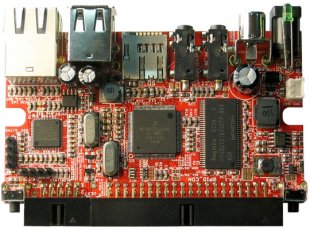
Embedded NetBSD on iMX233/OLinuXino
Petri Laakso has
worked to get NetBSD
going on the
iMX233/OLinuXino
ARM board, specifically the MAXI and MICRO boards. The port is stable enough to run multiuser and build software from pkgsrc. Supported hardware include
SD card,
GPIO,
USB host, and
a boot loader.
The hardware is ways below 50 EUR, so this is a good start to
get a nice and easy machine. More information on how to get things
running are available
in Petri's blog.
Last, the impatient souls that can't wait to start playing can
find the code in NetBSD-current
already, thanks to Matt Thomas.
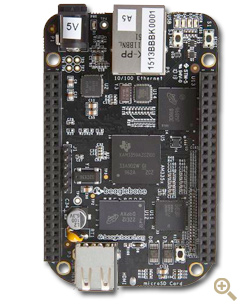
NetBSD on BeagleBone Black HOW-TO
NetBSD runs on a number of ARM platforms, and the
BeagleBone Black
is one of many such platforms. It comes with Linux by default,
and as such there are a few adventures to make if you want
NetBSD on it.
Update of NetBSD on the Raspberry Pi
Time has passed since
the last status update
of NetBSD on the Raspberry Pi, and things
have evolved:
Recent news include drivers for
USB with its many possible devices and display, allowing
X to be ran - check out
the screenshots provided by Jun Ebihara!
There is also
this posting on the port-arm mailinglist
that gives details on
an updates kernel image, Xorg.conf file to get X going
and more news hidden in that thread.
Anyone up for compiling a comprehensive
NetBSD/RaspberryPi webpage,
maybe on
the NetBSD Wiki?
NetBSD on the Raspberry Pi
The
Raspberry Pi
is a pretty recent, cheap ARM-based board, or as the
webpage
says: ``An ARM GNU/Linux box for $25''.
Shipping with today's Windows-for-embedde-boards
operating system (AKA Linux), there's also a port of
NetBSD on its way.
Nick Hudson is at it, and he has posted first
dmesg output
now, showing the machine going to multiuser mode.
The code's not integrated into mainline NetBSD-current yet,
but rest assured that that will happen when the code is ripe.
Good work, Nick!
Detailled setup instructions are available
on the port-arm mailing list
and
Paul's homepage.
Paul is also looking for feedback on the port, so if
you have a Mini2440 board, give it a spin and report back to Paul!
NetBSD ketchup - news from my mailbox
Here's another bunch of NetBSD-related news that has
been lingering in my inbox for far too long:
Izumi Tsutsui's
NetBSD/cobalt
restore CD is available based on NetBSD versions
5.0.25.1_RC2.
See the
for information on what it is and how to use it.
A negative symbol lookup cache was added
to NetBSD's loader
for shared libraries and shared objects, ld.so_elf, by
Roy Marples:
``I've been researching why Evolution from GNOME takes over 5 minutes to load on my quad core amd64 beast. It boils down to dlsym looking for a symbol that does not exist directly and as such examining every needed library. However, the current implementation does not remember what libraries it as already checked. Normally this isn't a problem, but with the way Evolution is built the search chain is massive.
[...]
With this patch, Evolution (without the patches to and a glib I added to pkgsrc a few days ago) loads in under 2 seconds (5 seconds with initial disk thrashing). ''
The NetBSD Logo
is available in many variants, but a new variant was submitted
via www@ these days by "Tim" - which is actually plain HTML,
no image:
⚑NetBSD Powered!
SafeNet's ProtectDrive is
``a full disk encryption solution that encrypts the entire hard drive of laptops, workstations and servers, as well as USB flash drives, to protect data in the case of the theft or loss of a hardware device.''
How do you implement such preboot authentication and
harddisk encryption software,
esp. if you want to provide thinks like LDAP integration for
the user/key handling and two-factor authentication?
Little is known, but rumors say the 32bit version of the software
is based on NetBSD, as is backed by
this worker bio info:
``Duties: Working on pre-boot restricted environment with loads before operation system and implemented on NetBSD.
Ported and optimized the KDrive X server to NetBSD.
Developed and implemented user secure authentication interface with smart card support.
Environment and tools : NetBSD (3.0), C/C++, FLTK''
A german-language introduction of pkgsrc on OpenSolaris
was given by Michael 'kvedulv' Moll at the Munich
OpenSolaris User Group back in march.
Slides
and a
video
are available.
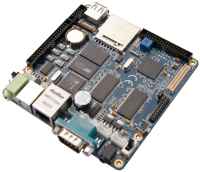
Are you still looking for a nice small
ARM-based board to start hacking on NetBSD/arm?
The http://www.friendlyarm.net/products/mini2440
may be a good start, esp. after
Paul Fleischer is reaching completion of NetBSD support
for the board. Citing from
his mail to port-arm:
``I have now fairly good (i.e., it works for me) support for the
MINI2440 on NetBSD with support for the following:
- S3C2440 UART
- DM9000 (MAC+PHY)
- S3C2440 SD Controller
- S3C2440 DMA Controller
- S3C2440 IIS Controller
- FriendlyArm 3,5" LCD Display
- S3C2440 USB Host Controller (OHCI)
- S3C2440 Touch Screen
- UDA1341TS audio codec
Currently, support for three things on the S3C2440 are missing:
- S3C2440 NAND Controller
- S3C2440 USB Device Controller
- S3C2440 RTC
I've also created a stage2 bootloader for use with u-boot, which
ensures that the value of bootargs is passed to the NetBSD kernel.
At this point I have only tested the code with the 64Mb version of the
FriendlyArm MINI2440.
While talking about NetBSD on cool hardware:
How about NetBSD/hpcarm on
WILLCOM | W-ZERO3 (WS004SH) mobile devices?
Here is a screenshot of Ebihara-san's WS011SH with CCW screen,
and there is also a video "booting NetBSD/hpcarm on WILLCOM | W-ZERO3(WS004SH)"
posted on YouTube:


 The port to the
  There's an
 Petri Laakso has
 NetBSD runs on a number of ARM platforms, and the

 Paul Fleischer has