|
[20160521]
|
Catching up: audio-mixing, arm, x86 and amd64 platform improvements and security
A few noteworthy things have happened in NetBSD land,
and being lazy I will collect them in one blog posting.
Here we go:
- In-kernel audio mixing:
So far, NetBSD's audio device can only be opened once.
If more than one application wants to play sound, the first one wins.
This is suboptimal if you want to (say) play some MP3s
but also get some occasional noise from your webbrowser.
Now, Nathanial Sloss has made a stab at this, providing
several implementation choices. Challenges in the task
are that sounds with different quality (sampling rate,
mono/stereo etc.) need to be brought to one common
quality before mixing and passing on to the actual audio
hardware. Further fun is added by the delay this process
adds.
See the discussion on tech-kern
for all the gory details!
- Freescale i.MX7 support:
Ryo Shimizu has committed support for the
Freescale i.MX7 processor
and the Atmark Techno Armadillo-IoT G3 board.
according to
his posting to port-arm (dmesg included),
UART, Ethernet, USB, SDHC, RTC, GPIO, WDOG and MULTIPROCESSOR work.
Interesting thing of the platform is that is has
two Cortex-A7 cores and one Cortex-M4 core, the latter without
MMU. Ideas on how to use the latter are welcome! :)
- PIE binaries with PaX, ASLR+MPROTECT are now the default for i386.
ASLR and MPROTECT can be turned off either globally
or per-binary if any problems should arise. Be sure to
document those exceptions in your risk management! :-)
More information:
PaX,
PIE,
ASLR,
MPROTECT.
- Platform improvements for
i386 and
amd64. For amd64, Maxime Villard writes:
 - I cleaned up the asm code and fixed several comments, which makes the
   boot process much easier to understand.
 - I fixed the alignment for the text segment, so that it can be covered by
   more large pages [1] - thereby reducing TLB contention.
 - I fixed a bug in the way the secondary CPUs are launched [2], which
   caused them to crash if they tried to access an X-less page.
 - I took rodata out of the text+rodata chunk, and put it in the data+bss+
   PRELOADED_MODULES+BOOTSTRAP_TABLES chunk [3]. rodata was no longer large
   page optimized, and had RWX permissions.
 - I retook rodata out of the rodata+data+bss+PRELOADED_MODULES+
   BOOTSTRAP_TABLES chunk, and made the kernel map it independently without
   the W permision [4].
 - I made the kernel map rodata without the X permission, by using the NOX
   bit on its pages [5] (now that the secondary CPUs could handle that
   properly).
 - I took the data+bss chunk out of the data+bss+PRELOADED_MODULES+
   BOOTSTRAP_TABLES chunk, and made the kernel map it independently without
   X permission [6].
 - I made the kernel remap rodata and data+bss with large pages and proper
   permissions [7] - which reduces once again TLB contention.
See Maxime's posting to tech-kern
for all the footnotes. Likewise, Maxime also
tackled i386, and besides the changes from amd64, here is
the list of changes from his email:
 - on non-PAE i386, NOX does not exist. Therefore the mappings all have an
   additional X permission. To benefit from X-less mappings, your CPU must
   support PAE, and your kernel must be GENERIC_PAE.
 - the segments are not large-page-aligned, which means that probably some
   parts of the segments are still mapped with normal pages. It is still more
   optimized than it used to be, but not as much as amd64 is.
[Tags: aslr, audio, dmesg, freescale, imx7, mprotect, pax, pie, Security]
|
|
[20160213]
|
NetBSD on Google's Compute Engine (Update #1)
Benny Siegert
posted to Twitter
that he
got NetBSD going on
Google Compute Engine.
Similar to Amazon's AWS, Google Compute Engine, according to
their website,
``lets you create and run virtual machines on Google infrastructure. Compute Engine offers scale, performance, and value that allows you to easily launch large compute clusters on Google's infrastructure. There are no upfront investments and you can run thousands of virtual CPUs on a system that has been designed to be fast, and to offer strong consistency of performance.''
For more information, see
dmesg output.
Update: Twitter link fixed
[Tags: aws, dmesg, google, googlecomputeengine]
|
|
[20151126]
|
Wireless, finally - with NetBSD on my Raspberry Pi
I've (literally) coughed up some time to play with my RPI2
the last few days, and I finally got it working with
my LogiLink RALINK RA5370 USB-WiFi dongle.
Patches are
thanks to rjs@, and this gets the machine
into a state that I think it's useful to start toying with
GPIO and I2C.
For a start, src/share/examples/wpa_supplicant/wpa_supplicand.conf now
has an example for a WPA network with no SSID broadcast.
For kicks, here's the full dmesg output:
Copyright (c) 1996, 1997, 1998, 1999, 2000, 2001, 2002, 2003, 2004, 2005,
    2006, 2007, 2008, 2009, 2010, 2011, 2012, 2013, 2014, 2015
    The NetBSD Foundation, Inc.  All rights reserved.
Copyright (c) 1982, 1986, 1989, 1991, 1993
    The Regents of the University of California.  All rights reserved.

NetBSD 7.99.21 (RPI2) #14: Thu Nov 26 01:36:58 CET 2015
	feyrer@promise.local:/Users/feyrer/work/NetBSD/cvs/src-current/obj.evbarm-Darwin-XXX/sys/arch/evbarm/compile/RPI2
total memory = 944 MB
avail memory = 925 MB
sysctl_createv: sysctl_create(machine_arch) returned 17
timecounter: Timecounters tick every 10.000 msec
mainbus0 (root)
cpu0 at mainbus0 core 0: 600 MHz Cortex-A7 r0p5 (Cortex V7A core)
cpu0: DC enabled IC enabled WB disabled EABT branch prediction enabled
cpu0: 32KB/32B 2-way L1 VIPT Instruction cache
cpu0: 32KB/64B 4-way write-back-locking-C L1 PIPT Data cache
cpu0: 512KB/64B 8-way write-through L2 PIPT Unified cache
vfp0 at cpu0: NEON MPE (VFP 3.0+), rounding, NaN propagation, denormals
cpu1 at mainbus0 core 1
cpu2 at mainbus0 core 2
cpu3 at mainbus0 core 3
obio0 at mainbus0
bcmicu0 at obio0: Multiprocessor
armgtmr0 at obio0: ARMv7 Generic 64-bit Timer (19200 kHz)
armgtmr0: interrupting on irq 3
timecounter: Timecounter "armgtmr0" frequency 19200000 Hz quality 500
bcmmbox0 at obio0 intr 193: VC mailbox
vcmbox0 at bcmmbox0
vchiq0 at obio0 intr 194: BCM2835 VCHIQ
bcmpm0 at obio0: Power management, Reset and Watchdog controller
bcmdmac0 at obio0: DMA0 DMA2 DMA4 DMA5 DMA8 DMA9 DMA10
bcmrng0 at obio0: RNG
plcom0 at obio0 intr 185
plcom0: txfifo disabled
plcom0: console
genfb0 at obio0
genfb0: framebuffer at 0x3d876000, size 1280x720, depth 32, stride 5120
wsdisplay0 at genfb0 kbdmux 1
wsmux1: connecting to wsdisplay0
wsdisplay0: screen 0-3 added (default, vt100 emulation)
sdhc0 at obio0 intr 190: SDHC controller
sdhc0: interrupting on intr 190
dwctwo0 at obio0 intr 137: USB controller
bcmspi0 at obio0 intr 182: SPI
spi0 at bcmspi0: SPI bus
bsciic0 at obio0 intr 181: BSC0
iic0 at bsciic0: I2C bus
bsciic1 at obio0 intr 181: BSC1
iic1 at bsciic1: I2C bus
bcmgpio0 at obio0: GPIO [0...31]
gpio0 at bcmgpio0: 32 pins
bcmgpio1 at obio0: GPIO [32...53]
gpio1 at bcmgpio1: 22 pins
bcmcm at obio0 not configured
bcmpwm at obio0 not configured
usb0 at dwctwo0: USB revision 2.0
timecounter: Timecounter "clockinterrupt" frequency 100 Hz quality 0
cpu3: 600 MHz Cortex-A7 r0p5 (Cortex V7A core)
cpu3: DC enabled IC enabled WB disabled EABT branch prediction enabled
cpu3: 32KB/32B 2-way L1 VIPT Instruction cache
cpu3: 32KB/64B 4-way write-back-locking-C L1 PIPT Data cache
cpu3: 512KB/64B 8-way write-through L2 PIPT Unified cache
vfp3 at cpu3: NEON MPE (VFP 3.0+), rounding, NaN propagation, denormals
cpu2: 600 MHz Cortex-A7 r0p5 (Cortex V7A core)
cpu2: DC enabled IC enabled WB disabled EABT branch prediction enabled
cpu2: 32KB/32B 2-way L1 VIPT Instruction cache
cpu2: 32KB/64B 4-way write-back-locking-C L1 PIPT Data cache
cpu2: 512KB/64B 8-way write-through L2 PIPT Unified cache
vfp2 at cpu2: NEON MPE (VFP 3.0+), rounding, NaN propagation, denormals
cpu1: 600 MHz Cortex-A7 r0p5 (Cortex V7A core)
cpu1: DC enabled IC enabled WB disabled EABT branch prediction enabled
cpu1: 32KB/32B 2-way L1 VIPT Instruction cache
cpu1: 32KB/64B 4-way write-back-locking-C L1 PIPT Data cache
cpu1: 512KB/64B 8-way write-through L2 PIPT Unified cache
vfp1 at cpu1: NEON MPE (VFP 3.0+), rounding, NaN propagation, denormals
sdhc0: SDHC 3.0, rev 153, platform DMA, 250000 kHz, HS SDR50 3.3V, re-tuning mode 1, 1024 byte blocks
sdmmc0 at sdhc0 slot 0
uhub0 at usb0: vendor 0000 DWC2 root hub, class 9/0, rev 2.00/1.00, addr 1
uhub0: 1 port with 1 removable, self powered
IPsec: Initialized Security Association Processing.
ld0 at sdmmc0: <0x03:0x5344:SU16G:0x80:0x000dd697:0x0f1>
ld0: 15193 MB, 7717 cyl, 64 head, 63 sec, 512 bytes/sect x 31116288 sectors
ld0: 4-bit width, SDR50, 100.000 MHz
uhub1 at uhub0 port 1: vendor 0424 product 9514, class 9/0, rev 2.00/2.00, addr 2
uhub1: multiple transaction translators
uhub1: 5 ports with 4 removable, self powered
usmsc0 at uhub1 port 1
usmsc0: vendor 0424 product ec00, rev 2.00/2.00, addr 3
usmsc0: Ethernet address b8:27:eb:b9:ca:25
ukphy0 at usmsc0 phy 1: OUI 0x00800f, model 0x000c, rev. 3
ukphy0: 10baseT, 10baseT-FDX, 100baseTX, 100baseTX-FDX, auto
run0 at uhub1 port 2
run0: Ralink 802.11 n WLAN, rev 2.00/1.01, addr 4
run0: MAC/BBP RT5390 (rev 0x0502), RF RT5370 (MIMO 1T1R), address 7c:dd:90:3f:54:00
run0: 11b rates: 1Mbps 2Mbps 5.5Mbps 11Mbps
run0: 11g rates: 1Mbps 2Mbps 5.5Mbps 11Mbps 6Mbps 9Mbps 12Mbps 18Mbps 24Mbps 36Mbps 48Mbps 54Mbps
boot device: ld0
root on ld0a dumps on ld0b
root file system type: ffs
kern.module.path=/stand/evbarm/7.99.21/modules
vchiq: local ver 6 (min 3), remote ver 6.
vcaudio0 at vchiq0: auds
WARNING: no TOD clock present
WARNING: using filesystem time
WARNING: CHECK AND RESET THE DATE!
audio0 at vcaudio0: half duplex, playback, capture, independent
wsdisplay0: screen 4 added (default, vt100 emulation)
[Tags: dmesg, ra5370, raspberrypi]
|
|
[20150702]
|
BSD dmesg collection service
I'm always into serious dmesg pr0n,
and apparently there's a hub collecting those
that I've missed so far, ran by the fine folks from NYCBUG:
dmesgd.nycbug.org.
By default it lists the latest submissions of a number of
BSD variants, but it's also possible to just get
everyone's favourite easily.
To submit a dmesg of NetBSD running on your favourite
hardware (or software / virtualization, of course),
there is
a webpage to add your own dmesg.
Also,
statistics are available.
Check it out!
[Tags: dmesg]
|
|
[20140312]
|
NetBSD/arm news: netwalker, SMP, DTrace
In the past few weeks, several news items
regarding NetBSD's port to ARM platforms came up:
-
 The port to the NETWALKER (Cortex-A8) platform works as
confirmed by Jun Ebihara,
including instructions on how to set things up and
dmesg output.
The port to the NETWALKER (Cortex-A8) platform works as
confirmed by Jun Ebihara,
including instructions on how to set things up and
dmesg output.
- Ryota Ozaki is working on porting DTrace to ARM
- Matt Thomas is making the ARM port ready to use
multiple CPUs, see his posting,
which shows a list of processes and their associated CPU.
[Tags: arm, dmesg, dtrace, netwalker, smp]
|
|
[20131019]
|
Raspberry Pi USB HC driver change - DMA support added
Nick Hudson
reports
that he has ``recently switched the Raspberry Pi kernel to dwctwo(4) a new USB drvier based on the Synopsys code. It's a more complete driver than the previous dotg(4) and has DMA support''.
Jun Ebihara
confirms
that the driver works fine with a dmesg extract, and also lets us
know that the driver will be in his next RPI image.
This change does not only affect the Raspberry Pi, but also
other machines that have a Synopsis USB like the
OpenBlocks 600, as KIYOHARA Takashi
lets us know.
[Tags: dmesg, raspberrypi, usb]
|
|
[20131008]
|
Embedded NetBSD on iMX233/OLinuXino
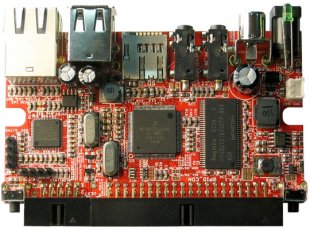 Petri Laakso has
worked to get NetBSD
going on the
iMX233/OLinuXino
ARM board, specifically the MAXI and MICRO boards. The port is stable enough to run multiuser and build software from pkgsrc. Supported hardware include
SD card,
GPIO,
USB host, and
a boot loader.
Petri Laakso has
worked to get NetBSD
going on the
iMX233/OLinuXino
ARM board, specifically the MAXI and MICRO boards. The port is stable enough to run multiuser and build software from pkgsrc. Supported hardware include
SD card,
GPIO,
USB host, and
a boot loader.
The hardware is ways below 50 EUR, so this is a good start to
get a nice and easy machine. More information on how to get things
running are available
in Petri's blog.
Last, the impatient souls that can't wait to start playing can
find the code in NetBSD-current
already, thanks to Matt Thomas.
[Tags: arm, dmesg, imx233, olinuxino]
|
|
[20130114]
|
Update of NetBSD on the Raspberry Pi
 Time has passed since
the last status update
of NetBSD on the Raspberry Pi, and things
have evolved:
Recent news include drivers for
USB with its many possible devices and display, allowing
X to be ran - check out
the screenshots provided by Jun Ebihara!
Time has passed since
the last status update
of NetBSD on the Raspberry Pi, and things
have evolved:
Recent news include drivers for
USB with its many possible devices and display, allowing
X to be ran - check out
the screenshots provided by Jun Ebihara!
There is also
this posting on the port-arm mailinglist
that gives details on
an updates kernel image, Xorg.conf file to get X going
and more news hidden in that thread.
Anyone up for compiling a comprehensive
NetBSD/RaspberryPi webpage,
maybe on
the NetBSD Wiki?
[Tags: arm, dmesg, raspberrypi]
|
|
[20120714]
|
NetBSD on the Raspberry Pi
The
Raspberry Pi
is a pretty recent, cheap ARM-based board, or as the
webpage
says: ``An ARM GNU/Linux box for $25''.
Shipping with today's Windows-for-embedde-boards
operating system (AKA Linux), there's also a port of
NetBSD on its way.
Nick Hudson is at it, and he has posted first
dmesg output
now, showing the machine going to multiuser mode.
The code's not integrated into mainline NetBSD-current yet,
but rest assured that that will happen when the code is ripe.
Good work, Nick!
[Tags: arm, dmesg, raspberrypi]
|
|
[20120420]
|
More dmesg pr0n: NetBDS/Xen with 128 (virtual) CPUs
There was discussion about raising the number of
CPU(core)s supported by NetBSD the other day,
as the current limit of 32 isn't the sky any more
in 2012. In the process, Xen-hacker Manuel Bouyer
suggested using booting NetBSD ins a Xen DomU,
as you can assign up to 128 (virtual) cores to
a DomU.
Here's the dmesg output,
and I'm sure this is a lot faster than
simulating 128 CPUs in qemu.
So, how to go beyone 128 CPUs for testing?
Anyone played with Qemu recently, or even have some decent
hardware at hand? If so, be sure to post dmesg output
(and CC: me)!
[Tags: dmesg, xen]
|
|
Tags: ,
2bsd,
34c3,
3com,
501c3,
64bit,
aarch64,
acl,
acls,
acm,
acorn,
acpi,
acpitz,
adobe,
adsense,
advocacy,
Advocacy,
advogato,
aes,
afs,
aiglx,
aio,
airport,
alereon,
alex,
alix,
alpha,
altq,
am64t,
amazon,
amd,
amd64,
anatomy,
ansible,
apache,
apm,
apple,
arkeia,
arla,
arm,
art,
Article,
Articles,
ascii,
asiabsdcon,
aslr,
asterisk,
asus,
atf,
ath,
atheros,
atmel,
audio,
audiocodes,
autoconf,
avocent,
avr32,
aws,
axigen,
azure,
backup,
balloon,
banners,
basename,
bash,
bc,
beaglebone,
benchmark,
bigip,
binaryexploit,
bind,
blackmouse,
bldgblog,
blog,
blogs,
blosxom,
bluetooth,
board,
bonjour,
books,
boot,
boot-z,
bootprops,
bozohttpd,
bs2000,
bsd,
bsdca,
bsdcan,
bsdcertification,
bsdcg,
bsdforen,
bsdfreak,
bsdmac,
bsdmagazine,
bsdnexus,
bsdnow,
bsdstats,
bsdtalk,
bsdtracker,
bug,
build.sh,
busybox,
buttons,
bzip,
c-jump,
c99,
cafepress,
calendar,
callweaver,
camera,
can,
candy,
capabilities,
card,
carp,
cars,
cauldron,
ccc,
ccd,
cd,
cddl,
cdrom,
cdrtools,
cebit,
centrino,
cephes,
cert,
certification,
cfs,
cgd,
cgf,
checkpointing,
china,
christos,
cisco,
cloud,
clt,
cobalt,
coccinelle,
codian,
colossus,
common-criteria,
community,
compat,
compiz,
compsci,
concept04,
config,
console,
contest,
copyright,
core,
cortina,
coverity,
cpu,
cradlepoint,
cray,
crosscompile,
crunchgen,
cryptography,
csh,
ctf,
cu,
cuneiform,
curses,
curtain,
cuwin,
cvs,
cvs-digest,
cvsup,
cygwin,
daemon,
daemonforums,
daimer,
danger,
darwin,
data,
date,
dd,
debian,
debugging,
dell,
desktop,
devd,
devfs,
devotionalia,
df,
dfd_keeper,
dhcp,
dhcpcd,
dhcpd,
dhs,
diezeit,
digest,
digests,
dilbert,
dirhash,
disklabel,
distcc,
dmesg,
Docs,
Documentation,
donations,
draco,
dracopkg,
dragonflybsd,
dreamcast,
dri,
driver,
drivers,
drm,
dsl,
dst,
dtrace,
dvb,
ec2,
eclipse,
eeepc,
eeepca,
ehci,
ehsm,
eifel,
elf,
em64t,
Embedded,
embedded,
emips,
emulate,
encoding,
envsys,
eol,
espresso,
etcupdate,
etherip,
euca2ools,
eucalyptus,
eurobsdcon,
eurosys,
Events,
exascale,
ext3,
f5,
facebook,
falken,
fan,
faq,
fatbinary,
features,
fefe,
ffs,
filesystem,
fileysstem,
firefox,
firewire,
fireworks,
flag,
flash,
flashsucks,
flickr,
flyer,
fmslabs,
force10,
fortunes,
fosdem,
fpga,
freebsd,
freedarwin,
freescale,
freex,
freshbsd,
friendlyAam,
friendlyarm,
fritzbox,
froscamp,
fsck,
fss,
fstat,
ftp,
ftpd,
fujitsu,
fun,
fundraising,
funds,
funny,
fuse,
fusion,
g4u,
g5,
galaxy,
games,
gcc,
gdb,
gentoo,
geode,
getty,
gimstix,
git,
gnome,
google,
google-soc,
googlecomputeengine,
gpio,
gpl,
gprs,
gracetech,
gre,
groff,
groupwise,
growfs,
grub,
gumstix,
guug,
gzip,
hackathon,
hackbench,
hal,
hanoi,
happabsd,
hardware,
Hardware,
haze,
hdaudio,
heat,
heimdal,
hf6to4,
hfblog,
hfs,
history,
hosting,
hotplug,
hp,
hp700,
hpcarm,
hpcsh,
hpux,
html,
httpd,
hubertf,
hurd,
i18n,
i386,
i386pkg,
ia64,
ian,
ibm,
ids,
ieee,
ifwatchd,
igd,
iij,
image,
images,
imx233,
imx7,
information,
init,
initrd,
install,
intel,
interix,
internet2,
interview,
interviews,
io,
ioccc,
iostat,
ipbt,
ipfilter,
ipmi,
ipplug,
ipsec,
ipv6,
irbsd,
irc,
irix,
iscsi,
isdn,
iso,
isp,
itojun,
jail,
jails,
japanese,
java,
javascript,
jetson,
jibbed,
jihbed,
jobs,
jokes,
journaling,
kame,
kauth,
kde,
kerberos,
kergis,
kernel,
keyboardcolemak,
kirkwood,
kitt,
kmod,
kolab,
kvm,
kylin,
l10n,
landisk,
laptop,
laptops,
law,
ld.so,
ldap,
lehmanns,
lenovo,
lfs,
libc,
license,
licensing,
linkedin,
links,
linksys,
linux,
linuxtag,
live-cd,
lkm,
localtime,
locate.updatedb,
logfile,
logging,
logo,
logos,
lom,
lte,
lvm,
m68k,
mac,
macmini,
macppc,
macromedia,
magicmouse,
mahesha,
mail,
makefs,
malo,
mame,
manpages,
marvell,
matlab,
maus,
max3232,
mbr95,
mbuf,
mca,
mdns,
mediant,
mediapack,
meetbsd,
mercedesbenz,
mercurial,
mesh,
meshcube,
mfs,
mhonarc,
microkernel,
microsoft,
midi,
mini2440,
miniroot,
minix,
mips,
mirbsd,
missile,
mit,
mixer,
mobile-ip,
modula3,
modules,
money,
mouse,
mp3,
mpls,
mprotect,
mtftp,
mult,
multics,
multilib,
multimedia,
music,
mysql,
named,
nas,
nasa,
nat,
ncode,
ncq,
ndis,
nec,
nemo,
neo1973,
netbook,
netboot,
netbsd,
netbsd.se,
nethack,
nethence,
netksb,
netstat,
netwalker,
networking,
neutrino,
nforce,
nfs,
nis,
npf,
npwr,
nroff,
nslu2,
nspluginwrapper,
ntfs-3f,
ntp,
nullfs,
numa,
nvi,
nvidia,
nycbsdcon,
office,
ofppc,
ohloh,
olimex,
olinuxino,
olpc,
onetbsd,
openat,
openbgpd,
openblocks,
openbsd,
opencrypto,
opendarwin,
opengrok,
openmoko,
openoffice,
openpam,
openrisk,
opensolaris,
openssl,
or1k,
oracle,
oreilly,
oscon,
osf1,
osjb,
paas,
packages,
pad,
pae,
pam,
pan,
panasonic,
parallels,
pascal,
patch,
patents,
pax,
paypal,
pc532,
pc98,
pcc,
pci,
pdf,
pegasos,
penguin,
performance,
pexpect,
pf,
pfsync,
pgx32,
php,
pie,
pike,
pinderkent,
pkg_install,
pkg_select,
pkgin,
pkglint,
pkgmanager,
pkgsrc,
pkgsrc.se,
pkgsrcCon,
pkgsrccon,
Platforms,
plathome,
pleiades,
pocketsan,
podcast,
pofacs,
politics,
polls,
polybsd,
portability,
posix,
postinstall,
power3,
powernow,
powerpc,
powerpf,
pppoe,
precedence,
preemption,
prep,
presentations,
prezi,
Products,
products,
proplib,
protectdrive,
proxy,
ps,
ps3,
psp,
psrset,
pthread,
ptp,
ptyfs,
Publications,
puffs,
puredarwin,
pwn,
pwntools,
pxe,
qemu,
qnx,
qos,
qt,
quality-management,
quine,
quote,
quotes,
r-project,
ra5370,
radio,
radiotap,
raid,
raidframe,
rants,
raptor,
raq,
raspberrypi,
rc.d,
rc2,
readahead,
realtime,
record,
refuse,
reiserfs,
Release,
Releases,
releases,
releng,
reports,
resize,
restore,
ricoh,
rijndael,
rip,
riscos,
rng,
roadmap,
robopkg,
robot,
robots,
roff,
rootserver,
rotfl,
rox,
rs323,
rs6k,
rss,
ruby,
rump,
rzip,
sa,
safenet,
san,
sata,
savin,
sbsd,
scampi,
scheduler,
scheduling,
schmonz,
sco,
screen,
script,
sdf,
sdtemp,
secmodel,
security,
Security,
sed,
segvguard,
seil,
sendmail,
serial,
serveraptor,
sfu,
sge,
sgi,
sgimips,
sh,
sha2,
shark,
sharp,
shisa,
shutdown,
sidekick,
size,
slackware,
slashdot,
slides,
slit,
smbus,
smp,
sockstat,
soekris,
softdep,
softlayer,
software,
solaris,
sony,
sound,
source,
source-changes,
spanish,
sparc,
sparc64,
spider,
spreadshirt,
spz,
squid,
ssh,
sshfs,
ssp,
statistics,
stereostream,
stickers,
storage,
stty,
studybsd,
subfile,
sudbury,
sudo,
summit,
sun,
sun2,
sun3,
sunfire,
sunpci,
support,
sus,
suse,
sushi,
susv3,
svn,
swcrypto,
symlinks,
sysbench,
sysctl,
sysinst,
sysjail,
syslog,
syspkg,
systat,
systrace,
sysupdate,
t-shirt,
tabs,
talks,
tanenbaum,
tape,
tcp,
tcp/ip,
tcpdrop,
tcpmux,
tcsh,
teamasa,
tegra,
teredo,
termcap,
terminfo,
testdrive,
testing,
tetris,
tex,
TeXlive,
thecus,
theopengroup,
thin-client,
thinkgeek,
thorpej,
threads,
time,
time_t,
timecounters,
tip,
tk1,
tme,
tmp,
tmpfs,
tnf,
toaster,
todo,
toolchain,
top,
torvalds,
toshiba,
touchpanel,
training,
translation,
tso,
tty,
ttyrec,
tulip,
tun,
tuning,
uboot,
ucom,
udf,
ufs,
ukfs,
ums,
unetbootin,
unicos,
unix,
updating,
upnp,
uptime,
usb,
usenix,
useradd,
userconf,
userfriendly,
usermode,
usl,
utc,
utf8,
uucp,
uvc,
uvm,
valgrind,
vax,
vcfe,
vcr,
veriexec,
vesa,
video,
videos,
virtex,
virtualization,
vm,
vmware,
vnd,
vobb,
voip,
voltalinux,
vpn,
vpnc,
vulab,
w-zero3,
wallpaper,
wapbl,
wargames,
wasabi,
webcam,
webfwlog,
wedges,
wgt624v3,
wiki,
willcom,
wimax,
window,
windows,
winmodem,
wireless,
wizd,
wlan,
wordle,
wpa,
wscons,
wstablet,
X,
x.org,
x11,
x2apic,
xbox,
xcast,
xen,
Xen,
xfree,
xfs,
xgalaxy,
xilinx,
xkcd,
xlockmore,
xmms,
xmp,
xorg,
xscale,
youos,
youtube,
zaurus,
zdump,
zfs,
zlib
'nuff.
Grab the RSS-feed,
index,
or go back to my regular NetBSD page
Disclaimer: All opinion expressed here is purely my own.
No responsibility is taken for anything.