|
[20170104]
|
Hotplugging RAM - uvm_hotplug(9), the Xen balloon(4) driver and portmasters' FAQ
Adding and removing hardware components in operation is common in
today's commoditized computing environments. This was not always
the case - in the past century, one had to power down a machine
in order to change network cards, harddisks or RAM.
A major step towards changing a system's configuration at runtime
for customers came with USB, but that's not where it ends - other
systems like PCI support hotplugging as well.
Another area where changing of the system's configuration is
the amount of Ramdom Access Memory (RAM) of a system.
Usually fixed, this is determined at system start time, and
then managed by the operating system's memory managent system.
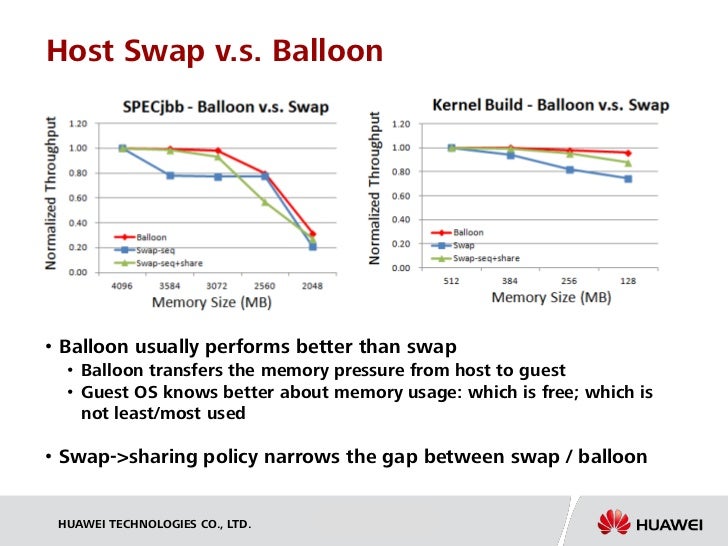
But esp. with today's virtualized hardware systems, even
the amount of RAM assigned to a system can easily be changed.
For example a VM can be assigned more RAM when needed,
without even rebooting the system, leading to
increased system
performance without introducing swapping/paging overhead.
Of course this required support from the operating system and
its memory management subsystem.
For NetBSD, the UVM
virtual memory system was now changed to support this via the
uvm_hotplug(9)
API, and a first user for this is the Xen
balloon(4)
driver.
Quoting from the
balloon(4) manpage,
``The balloon driver supports the memory ballooning operations offered in
Xen environments. It allows shrinking or extending a domain's available
memory by passing pages between different domains.''
The
uvm_hotplug(9)
manpage gives us more information on the UVM hotplug functionality:
``When the kernel is compiled with 'options UVM_HOTPLUG',
memory segments are handled in a dynamic data structure (rbtree(3)) com-
pared to a static array when not. This enables kernel code to add or
remove information about memory segments at any point after boot - thus
"hotplug".''
To answer more questions for portmasters who want to change
their ports, Cherry G. Mathew has now
posted a uvm_hotplug(9) port masters' FAQ.
It covers questions on the background, affected files,
and needed changes.
For more information on UVM,
see Charles' Chuck' Cranor's PhD disertation on
Design and Implementation of UVM
(PDF) as well as his
Usenix talk on the UVM Virtual Memory System (PS).
There is also
plenty of information available on Xen ballooning
- check it out and share your experiences on NetBSD's
port-xen mailing list!
[Tags: balloon, faq, hotplug, uvm, xen]
|
|
[20161109]
|
Looking at the scheduler issue again (Updated)
I've encountered a
funny scheduler behaviour the other day in a Xen enviroment.
The behaviour was that
CPU load was not distributed evenly on all CPUs, i.e. in my case
on a 2-CPU-system, two CPU-bound processes fought over the same
CPU, leaving the other one idle.
I had another look at this today, and was able to reproduce the
behaviour using VMWare Fusion with two CPU cores
on both NetBSD 7.0_STABLE as well as -current, both with
sources as of today, 2016-11-08.
I've also
made a screenshot available
that shows the issue on both systems.
I have also
filed a problem report
to document the issue.
The one hint that I got so far was from Michael van Elst that
there may be a rounding error in sched_balance().
Looking at the code, there is not much room for a rounding error.
But I am not familiar enough (at all) with the code, so I cannot judge
if crucial bits are dropped here, or how that function fits in the
whole puzzled.
Update:
Pondering on the "rounding error", I've setup both VMs with
4 CPUs, and the behaviour shown there is that load is
distributed to about 3 and a half CPU - three CPUs under
full load, and one not reaching 100%. There's definitely
something fishy in there.
See screenshot.
Splitting up the four CPUs on different processor sets with one process
assigned to each set (using psrset(8)) leads to an even load distribution
here, too. This leads me to thinking that the NetBSD scheduling works
well between different processor sets, but is busted within one set.
[Tags: amd64, scheduler, xen]
|
|
[20161105]
|
NetBSD 7.0/xen scheduling mystery, and how to fix it with processor sets
Today I had a need to do some number crunching using a home-brewn
C program. In order to do some manual load balancing, I was firing
up some Amazon AWS instances (which is Xen) with NetBSD 7.0.
In this case, the system was assigned two CPUs, from dmesg:
    # dmesg | grep cpu
    vcpu0 at hypervisor0: Intel(R) Xeon(R) CPU E5-2680 v2 @ 2.80GHz, id 0x306e4
    vcpu1 at hypervisor0: Intel(R) Xeon(R) CPU E5-2680 v2 @ 2.80GHz, id 0x306e4
I started two instances of my program, with the intent to
have each one use one CPU. Which is not what
happened! Here is what I observed, and how I fixed things for now.
I was looking at top(1) to see that everything was running fine,
and noticed funny WCPU and CPU values:
      PID USERNAME PRI NICE   SIZE   RES STATE      TIME   WCPU    CPU COMMAND
      2791 root      25    0  8816K  964K RUN/0     16:10 54.20% 54.20% myprog
      2845 root      26    0  8816K  964K RUN/0     17:10 47.90% 47.90% myprog
I expected something like WCPU and CPU being around 100%, assuming
that each process was bound to its own CPU. The values I actually
saw (and listed above) suggested that both programs were fighting
for the same CPU. Huh?!
top's CPU state shows:
    load averages:  2.15,  2.07,  1.82;               up 0+00:45:19        18:00:55
    27 processes: 2 runnable, 23 sleeping, 2 on CPU
    CPU states: 50.0% user,  0.0% nice,  0.0% system,  0.0% interrupt, 50.0% idle
    Memory: 119M Act, 7940K Exec, 101M File, 3546M Free
Which is not too useful. Typing "1" in top(1) lists the actual per-CPU usage
instead:
    load averages:  2.14,  2.08,  1.83;               up 0+00:45:56        18:01:32
    27 processes: 4 runnable, 21 sleeping, 2 on CPU
    CPU0 states:  100% user,  0.0% nice,  0.0% system,  0.0% interrupt,  0.0% idle
    CPU1 states:  0.0% user,  0.0% nice,  0.0% system,  0.0% interrupt,  100% idle
    Memory: 119M Act, 7940K Exec, 101M File, 3546M Free
This confirmed my suspicion that both processes were bound to one
CPU, and that the other one was idling. Bad! But how to fix?
One option is to kick your operating system out of the window,
but I still like NetBSD, so here's another solution:
NetBSD allows to create "processor sets",
assign CPU(s) to them and then assign processes to
the processor sets. Let's have a look!
Processor sets are manipulated using the
psrset(8) utility. By default all CPUs are in the same (system) processor set:
    # psrset
    system processor set 0: processor(s) 0 1
First step is to create a new processor set:
    # psrset -c
    1
    # psrset
    system processor set 0: processor(s) 0 1
    user processor set 1: empty
Next, assign one CPU to the new set:
    # psrset -a 1 1
    # psrset
    system processor set 0: processor(s) 0
    user processor set 1: processor(s) 1
Last, find out what the process IDs of my two (running) processes are,
and assign them to the two processor sets:
    # ps -u
    USER  PID %CPU %MEM   VSZ  RSS TTY     STAT STARTED     TIME COMMAND
    root 2791 52.0  0.0  8816  964 pts/4   R+    5:28PM 22:57.80 myprog
    root 2845 50.0  0.0  8816  964 pts/2   R+    5:26PM 23:33.97 myprog
    #
    # psrset -b 0 2791
    # psrset -b 1 2845
Note that this was done with the two processes running,
there is no need to stop and restart them!
The effect of the commands is imediate, as can be seen in top(1):
    load averages:  2.02,  2.05,  1.94;               up 0+00:59:32        18:15:08
    27 processes: 1 runnable, 24 sleeping, 2 on CPU
    CPU0 states:  100% user,  0.0% nice,  0.0% system,  0.0% interrupt,  0.0% idle
    CPU1 states:  100% user,  0.0% nice,  0.0% system,  0.0% interrupt,  0.0% idle
    Memory: 119M Act, 7940K Exec, 101M File, 3546M Free
    Swap:

      PID USERNAME PRI NICE   SIZE   RES STATE      TIME   WCPU    CPU COMMAND
     2845 root      25    0  8816K  964K CPU/1     26:14   100%   100% myprog
     2791 root      25    0  8816K  964K RUN/0     25:40   100%   100% myprog
Things are as expected now, with each program being bound to its
own CPU.
Now why this didn't happen by default is left as an exercise to the reader.
Hints that may help:
    # uname -a
    NetBSD foo.eu-west-1.compute.internal 7.0 NetBSD 7.0 (XEN3_DOMU.201509250726Z) amd64
    # dmesg
    ...
    hypervisor0 at mainbus0: Xen version 4.2.amazon
    VIRQ_DEBUG interrupt using event channel 3
    vcpu0 at hypervisor0: Intel(R) Xeon(R) CPU E5-2680 v2 @ 2.80GHz, id 0x306e4
    vcpu1 at hypervisor0: Intel(R) Xeon(R) CPU E5-2680 v2 @ 2.80GHz, id 0x306e4
AWS Instance type: c3.large
AMI ID: NetBSD-x86_64-7.0-201511211930Z-20151121-1142 (ami-ac983ddf)
[Tags: amazon, aws, psrset, scheduler, smp, xen]
|
|
[20150225]
|
NetBSD on IBM's SoftLayer and Microsoft's Azure and more
Xen is a common and popular virtualization platform today.
NetBSD was ported to it prety early.
Due to that, NetBSD cam be ran on any "cloud"
infrastructure that uses Xen, with
Amazon's EC2 cloud
probably the most prominent and largest one.
As the whole "cloud" and "platform as a service" (PaaS)
is lifting off, other virtualization platforms get popular,
which need attention from NetBSD.
The first one to note is
IBM's SoftLayer,
which uses its own virtualization technique that
supports many operating systems but strange enough not NetBSD.
To still get things going,
Emile "iMil" Heitor
has investigated the situation, and wrote
how to
install NetBSD (or any PV-capable system) on IBM's SoftLayer.
Another major platform to look for is Microsoft's Azure.
It uses Microsoft's ohn Hyper-V technique,
which there is no NetBSD support yet!
There is
a project description
"NetBSD/azure -- Bringing NetBSD to Microsoft Azure"
available that
got some pretty useful links
this week - any takers?
As starting point, there's code for
Running FreeBSD in Azure.
Last but not least, the last big
virtualization platfor amiss is KVM, which is used
e.g. in Google's cloud platform.
While there are some mentions that
NetBSD runs as guest operating system,
I am not sure what the latest state is.
Anyone in for a comparison? :)
[Tags: amazon, azure, ec2, google, ibm, microsoft, paas, softlayer, xen]
|
|
[20130324]
|
Ansible & EC2 - Playbooks for orchestrating NetBSD into the cloud
As follower of my blog you have
seen
the
steps
towards
getting NetBSD instances started in Amazon's EC2 cloud
with a simple web application deployed on one EC2 instance
and the database on another one.
These blog articles were very detailed on purpose, to have full
logfiles available just in case needed. I have used these logs to
prepare my
pkgsrcCon 2013
talk about Ansible and Amazon's EC2, so things can be looked at
without actually running anything. As it turns out this was good,
because the 32bit NetBSD instances that I've used during my
pkgsrcCon demonstration actually decided to do a kernel panic, and the presentation
was a bit more on the theoretical side than I originally planned.
Now after pkgsrcCon is over, I would like to
publish the presentation
slides with all the details, and especially the playbooks and all
other files to look at - enjoy!
[Tags: amazon, ansible, aws, ec2, pkgsrc, xen]
|
|
[20130321]
|
Ansible, EC2 and NetBSD final milestone 4 reached: Web and DB on separate VMs in the cloud
In the fourth and last step on my journey to use
Ansible
to bring a non-trivial system of a Web server and a DB server into
Amazon's EC2 cloud, this is the final step.
After starting out with a local VMware VM and making first steps
with Ansible and EC2, the
previous step was to push a single system
into the cloud. Now, the final step is to setup two distinct VMs, one
for the database and one for the webserver, and then make them known
to each other.
The single steps are:
- Prepare the two VMs
- Basic setup for all systems
- Install the database server
- Install the webserver
- Connect database and webserver
Again, here are all the steps in detail:
- As before, ensure local time is correct when talking to Amazon,
and also make sure the SSH agent has the proper key loaded.
% date
Thu Mar 21 00:45:37 CET 2013
% ssh-add -l
2048 d5:25:19:3d:59:40:35:32:03:f7:c5:83:de:19:b6:d0 ../../euca2ools/key-eucaHF.pem (RSA)
- Make sure security groups are setup properly. We use one group
for the database server, and one for the webserver. This defines the
access permissions from the internet, and also allows to identify
systems for their individual configuration and also for connecting
them in the final step:
% euca-describe-groups
...
GROUP   sg-ae54b3c5     749335780469    ec2-dbservers   Database servers
PERMISSION      749335780469    ec2-dbservers   ALLOWS  tcp     22      22      FROM    CIDR    0.0.0.0/0
PERMISSION      749335780469    ec2-dbservers   ALLOWS  tcp     3306    3306    FROM    CIDR    0.0.0.0/0
PERMISSION      749335780469    ec2-dbservers   ALLOWS  icmp    -1      -1      FROM    CIDR    0.0.0.0/0
GROUP   sg-a854b3c3     749335780469    ec2-webservers  Web servers
PERMISSION      749335780469    ec2-webservers  ALLOWS  tcp     22      22      FROM    CIDR    0.0.0.0/0
PERMISSION      749335780469    ec2-webservers  ALLOWS  tcp     80      80      FROM    CIDR    0.0.0.0/0
PERMISSION      749335780469    ec2-webservers  ALLOWS  icmp    -1      -1      FROM    CIDR    0.0.0.0/0
- Now, run our playbook to setup the two VMs. This uses the single
playbook from the previous milestone, and just runs it twice with
different security groups:
% ansible-playbook -i hosts-HF config-ec2-prepare-db+web-vm.yml

PLAY [localhost] *********************

TASK: [ec2-webservers | Launch new EC2 instance] *********************
changed: [127.0.0.1]

TASK: [ec2-webservers | Give the system 30 seconds to boot up] *********************
changed: [127.0.0.1]

TASK: [ec2-webservers | Get rid of SSH "Are you sure you want to continue connecting (yes/no)?" query] *********************
changed: [127.0.0.1]

TASK: [ec2-webservers | Fix /usr/bootstrap.sh to run pkgin with -y] *********************
changed: [127.0.0.1] => (item={'cmd': 'install /usr/bootstrap.sh /usr/bootstrap.sh.orig'})
changed: [127.0.0.1] => (item={'cmd': 'chmod +w /usr/bootstrap.sh'})
changed: [127.0.0.1] => (item={'cmd': 'sed "s,bin/pkgin update,bin/pkgin -y update," /usr/bootstrap.sh'})
changed: [127.0.0.1] => (item={'cmd': 'chmod -w /usr/bootstrap.sh'})

TASK: [ec2-webservers | Install pkgin via /usr/bootstrap.sh] *********************
changed: [127.0.0.1] => (item={'cmd': u'env PATH=/usr/sbin:${PATH} /usr/bootstrap.sh binpkg'})

TASK: [ec2-webservers | Copy over Ansible binary package] *********************
changed: [127.0.0.1]

TASK: [ec2-webservers | Install Ansible dependencies] *********************
changed: [127.0.0.1]

TASK: [ec2-webservers | Install Ansible package (manually)] *********************
changed: [127.0.0.1]

TASK: [ec2-webservers | Setup lame /usr/bin/python symlink] *********************
changed: [127.0.0.1]

TASK: [ec2-dbservers | Launch new EC2 instance] *********************
changed: [127.0.0.1]

TASK: [ec2-dbservers | Give the system 30 seconds to boot up] *********************
changed: [127.0.0.1]

TASK: [ec2-dbservers | Get rid of SSH "Are you sure you want to continue connecting (yes/no)?" query] *********************
changed: [127.0.0.1]

TASK: [ec2-dbservers | Fix /usr/bootstrap.sh to run pkgin with -y] *********************
changed: [127.0.0.1] => (item={'cmd': 'install /usr/bootstrap.sh /usr/bootstrap.sh.orig'})
changed: [127.0.0.1] => (item={'cmd': 'chmod +w /usr/bootstrap.sh'})
changed: [127.0.0.1] => (item={'cmd': 'sed "s,bin/pkgin update,bin/pkgin -y update," /usr/bootstrap.sh'})
changed: [127.0.0.1] => (item={'cmd': 'chmod -w /usr/bootstrap.sh'})

TASK: [ec2-dbservers | Install pkgin via /usr/bootstrap.sh] *********************
changed: [127.0.0.1] => (item={'cmd': u'env PATH=/usr/sbin:${PATH} /usr/bootstrap.sh binpkg'})

TASK: [ec2-dbservers | Copy over Ansible binary package] *********************
changed: [127.0.0.1]

TASK: [ec2-dbservers | Install Ansible dependencies] *********************
changed: [127.0.0.1]

TASK: [ec2-dbservers | Install Ansible package (manually)] *********************
changed: [127.0.0.1]

TASK: [ec2-dbservers | Setup lame /usr/bin/python symlink] *********************
changed: [127.0.0.1]

PLAY RECAP *********************
127.0.0.1                      : ok=18   changed=18   unreachable=0    failed=0
- Just to make sure, check that the two instances run properly, and
are in the right security groups, ec2-webservers and ec2-dbservers:
% euca-describe-instances
RESERVATION     r-a419f9d9      749335780469    ec2-webservers
INSTANCE        i-21b7c441      ami-5d0f8034    ...
RESERVATION     r-641efe19      749335780469    ec2-dbservers
INSTANCE        i-54a2ab3e      ami-5d0f8034    ...
- Next, bring the two freshly setup systems (which are already
capable of acting as ansible targets) up to our basic system setup:
% env ANSIBLE_HOSTS=./ec2.py ansible-playbook config-ec2-basic.yml

PLAY [security_group_ec2-webservers;security_group_ec2-dbservers] *********************

TASK: [ping] *********************
ok: [ec2-54-235-44-118.compute-1.amazonaws.com]
ok: [ec2-54-234-139-151.compute-1.amazonaws.com]

TASK: [Install tcsh] *********************
changed: [ec2-54-235-44-118.compute-1.amazonaws.com]
changed: [ec2-54-234-139-151.compute-1.amazonaws.com]

TASK: [Add user feyrer] *********************
changed: [ec2-54-234-139-151.compute-1.amazonaws.com]
changed: [ec2-54-235-44-118.compute-1.amazonaws.com]

TASK: [Create ~feyrer/.ssh directory] *********************
changed: [ec2-54-235-44-118.compute-1.amazonaws.com]
changed: [ec2-54-234-139-151.compute-1.amazonaws.com]

TASK: [Enable ssh login with ssh-key] *********************
changed: [ec2-54-235-44-118.compute-1.amazonaws.com]
changed: [ec2-54-234-139-151.compute-1.amazonaws.com]

TASK: [Install sudo] *********************
changed: [ec2-54-235-44-118.compute-1.amazonaws.com]
changed: [ec2-54-234-139-151.compute-1.amazonaws.com]

TASK: [Enable PW-less sudo-access for everyone in group 'wheel'] *********************
changed: [ec2-54-234-139-151.compute-1.amazonaws.com]
changed: [ec2-54-235-44-118.compute-1.amazonaws.com]

TASK: [Disable ssh logins as root] *********************
ok: [ec2-54-235-44-118.compute-1.amazonaws.com]
ok: [ec2-54-234-139-151.compute-1.amazonaws.com]

PLAY RECAP *********************
ec2-54-234-139-151.compute-1.amazonaws.com : ok=8    changed=6    unreachable=0    failed=0
ec2-54-235-44-118.compute-1.amazonaws.com : ok=8    changed=6    unreachable=0    failed=0
- Check:
% ssh ec2-54-234-139-151.compute-1.amazonaws.com id
uid=1000(feyrer) gid=100(users) groups=100(users),0(wheel)
%
% ssh ec2-54-235-44-118.compute-1.amazonaws.com id
uid=1000(feyrer) gid=100(users) groups=100(users),0(wheel)
- Now that the two machines run with our basline configuration,
install their individual software and settings. First the
database server:
% env ANSIBLE_HOSTS=./ec2.py ansible-playbook config-ec2-dbserver.yml

PLAY [security_group_ec2-dbservers] *********************

TASK: [Install mysql] *********************
changed: [ec2-54-235-44-118.compute-1.amazonaws.com]

TASK: [Install MySQL rc.d script] *********************
changed: [ec2-54-235-44-118.compute-1.amazonaws.com]

TASK: [Start MySQL service] *********************
changed: [ec2-54-235-44-118.compute-1.amazonaws.com]

TASK: [Install python-mysqldb (for mysql_user module)] *********************
changed: [ec2-54-235-44-118.compute-1.amazonaws.com]

TASK: [Setup DB] *********************
changed: [ec2-54-235-44-118.compute-1.amazonaws.com]

TASK: [Add db-user] *********************
changed: [ec2-54-235-44-118.compute-1.amazonaws.com]

TASK: [Copy over DB template] *********************
changed: [ec2-54-235-44-118.compute-1.amazonaws.com]

TASK: [Import DB data] *********************
changed: [ec2-54-235-44-118.compute-1.amazonaws.com]

PLAY RECAP *********************
ec2-54-235-44-118.compute-1.amazonaws.com : ok=8    changed=8    unreachable=0    failed=0
- Check and see if the database works as expected:
% ssh -t ec2-54-235-44-118.compute-1.amazonaws.com mysql -u webapp -p webapp
Enter password: ****
...
mysql> show tables;
+------------------+
| Tables_in_webapp |
+------------------+
| names            |
+------------------+
1 row in set (0.01 sec)

mysql> select * from names;
+----+--------+------+
| id | first  | last |
+----+--------+------+
|  1 | Donald | Duck |
|  2 | Daisy  | Duck |
+----+--------+------+
2 rows in set (0.00 sec)

mysql> bye
- Excellent. Now setup the webserver, too:
% env ANSIBLE_HOSTS=./ec2.py ansible-playbook config-ec2-webserver.yml

PLAY [security_group_ec2-webservers] *********************

TASK: [Installing ap24-php53 package and dependencies] *********************
changed: [ec2-54-234-139-151.compute-1.amazonaws.com]

TASK: [Install Apache rc.d script] *********************
changed: [ec2-54-234-139-151.compute-1.amazonaws.com]

TASK: [Enable and start Apache service] *********************
changed: [ec2-54-234-139-151.compute-1.amazonaws.com]

TASK: [Enable PHP in Apache config file] *********************
changed: [ec2-54-234-139-151.compute-1.amazonaws.com] => (item={'re': 'LoadModule.*mod_php5.so', 'l': 'LoadModule php5_module lib/httpd/mod_php5.so'})
changed: [ec2-54-234-139-151.compute-1.amazonaws.com] => (item={'re': 'AddHandler.*x-httpd-php', 'l': 'AddHandler application/x-httpd-php .php'})

TASK: [Make Apache read index.php] *********************
changed: [ec2-54-234-139-151.compute-1.amazonaws.com]

TASK: [Add simple PHP test - see http://10.0.0.181/phptest.php] *********************
changed: [ec2-54-234-139-151.compute-1.amazonaws.com]

TASK: [Install phpmyadmin] *********************
changed: [ec2-54-234-139-151.compute-1.amazonaws.com]

TASK: [Enable phpmyadmin in Apache config] *********************
changed: [ec2-54-234-139-151.compute-1.amazonaws.com]

TASK: [Fix Apache access control for phpmyadmin] *********************
changed: [ec2-54-234-139-151.compute-1.amazonaws.com]

TASK: [Enable PHP modules in PHP config file] *********************
changed: [ec2-54-234-139-151.compute-1.amazonaws.com] => (item={'re': '^extension.*zlib.so', 'l': 'extension=zlib.so'})
changed: [ec2-54-234-139-151.compute-1.amazonaws.com] => (item={'re': '^extension.*zip.so', 'l': 'extension=zip.so'})
changed: [ec2-54-234-139-151.compute-1.amazonaws.com] => (item={'re': '^extension.*mysqli.so', 'l': 'extension=mysqli.so'})
changed: [ec2-54-234-139-151.compute-1.amazonaws.com] => (item={'re': '^extension.*mysql.so', 'l': 'extension=mysql.so'})
changed: [ec2-54-234-139-151.compute-1.amazonaws.com] => (item={'re': '^extension.*mcrypt.so', 'l': 'extension=mcrypt.so'})
changed: [ec2-54-234-139-151.compute-1.amazonaws.com] => (item={'re': '^extension.*mbstring.so', 'l': 'extension=mbstring.so'})
changed: [ec2-54-234-139-151.compute-1.amazonaws.com] => (item={'re': '^extension.*json.so', 'l': 'extension=json.so'})
changed: [ec2-54-234-139-151.compute-1.amazonaws.com] => (item={'re': '^extension.*gd.so', 'l': 'extension=gd.so'})
changed: [ec2-54-234-139-151.compute-1.amazonaws.com] => (item={'re': '^extension.*gettext.so', 'l': 'extension=gettext.so'})
changed: [ec2-54-234-139-151.compute-1.amazonaws.com] => (item={'re': '^extension.*bz2.so', 'l': 'extension=bz2.so'})

TASK: [Create directory for webapp] *********************
changed: [ec2-54-234-139-151.compute-1.amazonaws.com]

TASK: [Deploy example webapp] *********************
changed: [ec2-54-234-139-151.compute-1.amazonaws.com]

TASK: [Create webapp symlink for easy access] *********************
changed: [ec2-54-234-139-151.compute-1.amazonaws.com]

NOTIFIED: [restart apache] *********************
changed: [ec2-54-234-139-151.compute-1.amazonaws.com]

PLAY RECAP *********************
ec2-54-234-139-151.compute-1.amazonaws.com : ok=14   changed=14   unreachable=0    failed=0
- Again, test:
% links -dump ec2-54-234-139-151.compute-1.amazonaws.com/
                                   It works!
%
% links -dump http://ec2-54-234-139-151.compute-1.amazonaws.com/phptest.php | head
   PHP Logo

                               PHP Version 5.3.17

   System          NetBSD ip-10-80-61-33.ec2.internal 6.0.1 NetBSD 6.0.1
                   (XEN3PAE_DOMU) i386
   Build Date      Dec 14 2012 10:31:13
                   './configure' '--with-config-file-path=/usr/pkg/etc'
                   '--with-config-file-scan-dir=/usr/pkg/etc/php.d'
                   '--sysconfdir=/usr/pkg/etc' '--localstatedir=/var'
%
% links -dump http://ec2-54-234-139-151.compute-1.amazonaws.com/webapp/
   Showing table hf.names:

   Cannot connect to database: Can't connect to local MySQL server through
   socket '/tmp/mysql.sock' (2)(2002)
- Close to optimum, but the last error is actually expectet: In
order for proper operation, the Database needs to grant the
webserver access, and the web server needs to know where the
database server is. So let's connect them!
This step is done by preparing a shell script on both systems, which
will then be ran to - depending on the system's security group - perform the
proper steps:
% env ANSIBLE_HOSTS=./ec2.py ansible-playbook config-ec2-connections.yml

PLAY [security_group_ec2-webservers;security_group_ec2-dbservers] *********************

TASK: [Collect EC2 host information] *********************
ok: [ec2-54-234-139-151.compute-1.amazonaws.com]
ok: [ec2-54-235-44-118.compute-1.amazonaws.com]

TASK: [Prepare connection-script in /tmp/do-connect-vms.sh] *********************
changed: [ec2-54-234-139-151.compute-1.amazonaws.com]
changed: [ec2-54-235-44-118.compute-1.amazonaws.com]

TASK: [Run connection-script] *********************
changed: [ec2-54-234-139-151.compute-1.amazonaws.com]
changed: [ec2-54-235-44-118.compute-1.amazonaws.com]

PLAY RECAP *********************
ec2-54-234-139-151.compute-1.amazonaws.com : ok=3    changed=2    unreachable=0    failed=0
ec2-54-235-44-118.compute-1.amazonaws.com : ok=3    changed=2    unreachable=0    failed=0
- With that final step, our test web application works, and the
webserver can access the database properly:
% links -dump http://ec2-54-234-139-151.compute-1.amazonaws.com/webapp/
   Showing table hf.names:

   +--------------------+
   | id | first  | last |
   |----+--------+------|
   | 1  | Donald | Duck |
   |----+--------+------|
   | 2  | Daisy  | Duck |
   +--------------------+

     ----------------------------------------------------------------------

   Enter new values:

   first:     _____________________
   last:      _____________________
   [ Submit ]
So much for this exercise. I'll talk about the ansible and euca2ools
packages at
pkgsrcCon 2013 in Berlin.
Join in if you're curious about
what the actual playbooks used in the above examples look like, or
stay tuned to find my presentation and all the data after pkgsrcCon
2013.
[Tags: amazon, ansible, ec2, xen]
|
|
[20130321]
|
Ansible, EC2 and NetBSD milestone 3 reached: Web and database in the cloud
With the previous work on
setting up a local VM as database and web server
and
setting up a Xen VM in Amazon's EC2 cloud
combined, it is pretty straight forward to setup a EC2 instance that
has all the software to serve a simple web application from the cloud.
The single steps are:
- Prepare the environment with proper time, SSH agent and EC2 firewall groups
- Setup EC2 instance with pkgin and ansible
- Do basic preparations to meet our standards for logins, shells and general usability and security
- Setup database server with DB software, user and import of data
- Setup web server with all the software and some demo application
The following details show all the commands can and their output in
more detail:
- Make sure time is set properly - needed when talking to Amazon EC2:
% sudo sh /etc/rc.d/ntpd stop
ntpd not running? (check /var/run/ntpd.pid).
% sudo sh /etc/rc.d/ntpdate restart
Setting date via ntp.
% sudo sh /etc/rc.d/ntpd start
Starting ntpd.
% date
Sat Mar 16 16:46:19 CET 2013
- Teach our EC2 SSH key to SSH agent, so we don't have to type a
password (which we don't know anyways - EC2 only works with SSH
keys):
% ssh-add -l
Could not open a connection to your authentication agent.
%
% eval `ssh-agent`
Agent pid 10467
% ssh-add -l
The agent has no identities.
% ssh-add ../../euca2ools/key-eucaHF.pem
Identity added: ../../euca2ools/key-eucaHF.pem (../../euca2ools/key-eucaHF.pem)
% ssh-add -l
2048 d5:25:19:3d:59:40:35:32:03:f7:c5:83:de:19:b6:d0 ../../euca2ools/key-eucaHF.pem (RSA)
- Check security (firewall) groups - those are stored in EC2, and
we
have previously
set them up:
% euca-describe-groups
...
GROUP   sg-a854b3c3     749335780469    ec2-webservers  Web servers
PERMISSION      749335780469    ec2-webservers  ALLOWS  tcp     22      22      FROM    CIDR    0.0.0.0/0
PERMISSION      749335780469    ec2-webservers  ALLOWS  tcp     80      80      FROM    CIDR    0.0.0.0/0
PERMISSION      749335780469    ec2-webservers  ALLOWS  icmp    -1      -1      FROM    CIDR    0.0.0.0/0
- See if there are any EC2 instances running:
% euca-describe-instances
%
No - that's fine, we are about to change that!
- Run first playbook to launch EC2 instance and prepare it for
using with ansible:
% ansible-playbook -i hosts-HF config-ec2-prepare1vm.yml

PLAY [localhost] *********************

TASK: [Launch new EC2 instance] *********************
changed: [127.0.0.1]

TASK: [Give the system 30 seconds to boot up] *********************
changed: [127.0.0.1]

TASK: [Get rid of SSH "Are you sure you want to continue connecting (yes/no)?" query] *********************
changed: [127.0.0.1]

TASK: [Fix /usr/bootstrap.sh to run pkgin with -y] *********************
changed: [127.0.0.1] => (item={'cmd': 'install /usr/bootstrap.sh /usr/bootstrap.sh.orig'})
changed: [127.0.0.1] => (item={'cmd': 'chmod +w /usr/bootstrap.sh'})
changed: [127.0.0.1] => (item={'cmd': 'sed "s,bin/pkgin update,bin/pkgin -y update," /usr/bootstrap.sh'})
changed: [127.0.0.1] => (item={'cmd': 'chmod -w /usr/bootstrap.sh'})

TASK: [Install pkgin via /usr/bootstrap.sh] *********************
changed: [127.0.0.1] => (item={'cmd': u'env PATH=/usr/sbin:${PATH} /usr/bootstrap.sh binpkg'})

TASK: [Copy over Ansible binary package] *********************
changed: [127.0.0.1]

TASK: [Install Ansible dependencies] *********************
changed: [127.0.0.1]

TASK: [Install Ansible package (manually)] *********************
changed: [127.0.0.1]

TASK: [Setup lame /usr/bin/python symlink] *********************
changed: [127.0.0.1]

PLAY RECAP *********************
127.0.0.1                      : ok=9    changed=9    unreachable=0    failed=0
We now have a EC2 instance running that has Ansible installed:
% euca-describe-instances
RESERVATION     r-d77272ad      749335780469    ec2-webservers
INSTANCE        i-9fafc2f2      ami-5d0f8034    ec2-107-22-69-112.compute-1.amazonaws.com ...
- With this EC2 instance, we can do some basic preparations for our
standards, e.g. a login without requiring root (and while there, actually
disable allowing as root), setup sudo and a proper shell:
% env ANSIBLE_HOSTS=./ec2.py ansible-playbook config-ec2-basic.yml

PLAY [security_group_ec2-webservers] *********************

TASK: [ping] *********************
ok: [ec2-107-22-69-112.compute-1.amazonaws.com]

TASK: [Install tcsh] *********************
changed: [ec2-107-22-69-112.compute-1.amazonaws.com]

TASK: [Add user feyrer] *********************
changed: [ec2-107-22-69-112.compute-1.amazonaws.com]

TASK: [Create ~feyrer/.ssh directory] *********************
changed: [ec2-107-22-69-112.compute-1.amazonaws.com]

TASK: [Enable ssh login with ssh-key] *********************
changed: [ec2-107-22-69-112.compute-1.amazonaws.com]

TASK: [Install sudo] *********************
changed: [ec2-107-22-69-112.compute-1.amazonaws.com]

TASK: [Enable PW-less sudo-access for everyone in group 'wheel'] *********************
changed: [ec2-107-22-69-112.compute-1.amazonaws.com]

TASK: [Disable ssh logins as root] *********************
ok: [ec2-107-22-69-112.compute-1.amazonaws.com]

PLAY RECAP *********************
ec2-107-22-69-112.compute-1.amazonaws.com : ok=8    changed=6    unreachable=0    failed=0
Let's have a look if things actually work:
% ssh 107.22.69.112 id
uid=1000(feyrer) gid=100(users) groups=100(users),0(wheel)
% ssh ec2-107-22-69-112.compute-1.amazonaws.com id
uid=1000(feyrer) gid=100(users) groups=100(users),0(wheel)
% ssh ec2-107-22-69-112.compute-1.amazonaws.com sudo id
uid=0(root) gid=0(wheel) groups=0(wheel),2(kmem),3(sys),4(tty),5(operator),20(staff),31(guest)
- Next, install database software and import our demo database, just
as we did in out local VM:
% env ANSIBLE_HOSTS=./ec2.py ansible-playbook config-ec2-dbserver.yml

PLAY [security_group_ec2-webservers] *********************

TASK: [Install mysql] *********************
changed: [ec2-107-22-69-112.compute-1.amazonaws.com]

TASK: [Install MySQL rc.d script] *********************
changed: [ec2-107-22-69-112.compute-1.amazonaws.com]

TASK: [Start MySQL service] *********************
changed: [ec2-107-22-69-112.compute-1.amazonaws.com]

TASK: [Install python-mysqldb (for mysql_user module)] *********************
changed: [ec2-107-22-69-112.compute-1.amazonaws.com]

TASK: [Setup DB] *********************
changed: [ec2-107-22-69-112.compute-1.amazonaws.com]

TASK: [Add db-user] *********************
changed: [ec2-107-22-69-112.compute-1.amazonaws.com]

TASK: [Copy over DB template] *********************
changed: [ec2-107-22-69-112.compute-1.amazonaws.com]

TASK: [Import DB data] *********************
changed: [ec2-107-22-69-112.compute-1.amazonaws.com]

PLAY RECAP *********************
ec2-107-22-69-112.compute-1.amazonaws.com : ok=8    changed=8    unreachable=0    failed=0
Again, let's see if everything works as expected:
% ssh ec2-107-22-69-112.compute-1.amazonaws.com
...
ip-10-202-65-196: {1} mysql -u webapp -p webapp
Enter password: ******
...
mysql> show tables;
+------------------+
| Tables_in_webapp |
+------------------+
| names            |
+------------------+
1 row in set (0.00 sec)

mysql> select * from names;
+----+--------+------+
| id | first  | last |
+----+--------+------+
|  1 | Donald | Duck |
|  2 | Daisy  | Duck |
+----+--------+------+
2 rows in set (0.00 sec)

mysql> exit
Bye
ip-10-202-65-196: {2} exit
logout
Connection to ec2-107-22-69-112.compute-1.amazonaws.com closed.
- Last, add Apache+PHP and our small demo web-application:
% env ANSIBLE_HOSTS=./ec2.py ansible-playbook config-ec2-webserver.yml

PLAY [security_group_ec2-webservers] *********************

TASK: [Installing ap24-php53 package and dependencies] *********************
changed: [ec2-107-22-69-112.compute-1.amazonaws.com]

TASK: [Install Apache rc.d script] *********************
changed: [ec2-107-22-69-112.compute-1.amazonaws.com]

TASK: [Enable and start Apache service] *********************
changed: [ec2-107-22-69-112.compute-1.amazonaws.com]

TASK: [Enable PHP in Apache config file] *********************
changed: [ec2-107-22-69-112.compute-1.amazonaws.com] => (item={'re': 'LoadModule.*mod_php5.so', 'l': 'LoadModule php5_module lib/httpd/mod_php5.so'})
changed: [ec2-107-22-69-112.compute-1.amazonaws.com] => (item={'re': 'AddHandler.*x-httpd-php', 'l': 'AddHandler application/x-httpd-php .php'})

TASK: [Make Apache read index.php] *********************
changed: [ec2-107-22-69-112.compute-1.amazonaws.com]

TASK: [Add simple PHP test - see http://10.0.0.181/phptest.php] *********************
changed: [ec2-107-22-69-112.compute-1.amazonaws.com]

TASK: [Install phpmyadmin] *********************
changed: [ec2-107-22-69-112.compute-1.amazonaws.com]

TASK: [Enable phpmyadmin in Apache config] *********************
changed: [ec2-107-22-69-112.compute-1.amazonaws.com]

TASK: [Fix Apache access control for phpmyadmin] *********************
changed: [ec2-107-22-69-112.compute-1.amazonaws.com]

TASK: [Enable PHP modules in PHP config file] *********************
changed: [ec2-107-22-69-112.compute-1.amazonaws.com] => (item={'re': '^extension.*zlib.so', 'l': 'extension=zlib.so'})
changed: [ec2-107-22-69-112.compute-1.amazonaws.com] => (item={'re': '^extension.*zip.so', 'l': 'extension=zip.so'})
changed: [ec2-107-22-69-112.compute-1.amazonaws.com] => (item={'re': '^extension.*mysqli.so', 'l': 'extension=mysqli.so'})
changed: [ec2-107-22-69-112.compute-1.amazonaws.com] => (item={'re': '^extension.*mysql.so', 'l': 'extension=mysql.so'})
changed: [ec2-107-22-69-112.compute-1.amazonaws.com] => (item={'re': '^extension.*mcrypt.so', 'l': 'extension=mcrypt.so'})
changed: [ec2-107-22-69-112.compute-1.amazonaws.com] => (item={'re': '^extension.*mbstring.so', 'l': 'extension=mbstring.so'})
changed: [ec2-107-22-69-112.compute-1.amazonaws.com] => (item={'re': '^extension.*json.so', 'l': 'extension=json.so'})
changed: [ec2-107-22-69-112.compute-1.amazonaws.com] => (item={'re': '^extension.*gd.so', 'l': 'extension=gd.so'})
changed: [ec2-107-22-69-112.compute-1.amazonaws.com] => (item={'re': '^extension.*gettext.so', 'l': 'extension=gettext.so'})
changed: [ec2-107-22-69-112.compute-1.amazonaws.com] => (item={'re': '^extension.*bz2.so', 'l': 'extension=bz2.so'})

TASK: [Create directory for webapp] *********************
changed: [ec2-107-22-69-112.compute-1.amazonaws.com]

TASK: [Deploy example webapp] *********************
changed: [ec2-107-22-69-112.compute-1.amazonaws.com]

TASK: [Create webapp symlink for easy access] *********************
changed: [ec2-107-22-69-112.compute-1.amazonaws.com]

NOTIFIED: [restart apache] *********************
changed: [ec2-107-22-69-112.compute-1.amazonaws.com]

PLAY RECAP *********************
ec2-107-22-69-112.compute-1.amazonaws.com : ok=14   changed=14   unreachable=0    failed=0
- Test!
% links -dump http://ec2-107-22-69-112.compute-1.amazonaws.com/
                                   It works!

% links -dump http://ec2-107-22-69-112.compute-1.amazonaws.com/phptest.php
   PHP Logo

                               PHP Version 5.3.17

   System          NetBSD ip-10-202-65-196.ec2.internal 6.0.1 NetBSD 6.0.1
                   (XEN3PAE_DOMU) i386
   Build Date      Dec 14 2012 10:31:13
...

% links -dump http://ec2-107-22-69-112.compute-1.amazonaws.com/webapp/
   Showing table hf.names:

   +--------------------+
   | id | first  | last |
   |----+--------+------|
   | 1  | Donald | Duck |
   |----+--------+------|
   | 2  | Daisy  | Duck |
   +--------------------+

     ----------------------------------------------------------------------

   Enter new values:

   first:     _____________________
   last:      _____________________
   [ Submit ]
- At this point, everything is setup and can be enjoyed.
If the instance is needed no longer, it can be terminated:
% euca-describe-instances
RESERVATION     r-d77272ad      749335780469    ec2-webservers
INSTANCE        i-9fafc2f2      ami-5d0f8034    ec2-107-22-69-112.compute-1.amazonaws.com       ...
% euca-terminate-instances i-9fafc2f2
INSTANCE        i-9fafc2f2
% euca-describe-instances
RESERVATION     r-d77272ad      749335780469    ec2-webservers
INSTANCE        i-9fafc2f2      ami-5d0f8034                    terminated      eucaHF  ...
What's next on my journey is to put database and webserver into
separate VMs. First one of each, and then see if I find the nerve to
look into a setup with more redundancy.
I'll talk about the ansible and euca2ools packages at
pkgsrcCon 2013 in Berlin.
Join in if you're curious about
what the actual playbooks used in the above examples look like!
[Tags: amazon, ansible, apache, ec2, mysql, php, xen]
|
|
[20130314]
|
Ansible, EC2 and NetBSD milestone 2 reached: Instance preparation and communication
On my quest to use Ansible to get a NetBSD virtual machine into Amazon's EC2
cloud, I've previously
described
how I use ansible to prepare a local machine. Working from a basic NetBSD setup,
the system is setup for basic operation, the configured as both a database server
and a Web/PHP server to serve a small demo application.
Now the next step is to replace the VM with an Amazon EC2 instance.
I have previously written about how to manage Amazon/EC2 NetBSD instances,
and here are the steps that I make to first prepare an EC2 instance with NetBSD and Ansible,
and then use a regular Ansible playbook to talk to all my EC2 instances.
Note that the connection between the machines setup via euca2ools
and ansible is in the security group names. In this case,
the security group "ec2-webservers" is assumed to exist.
- Make sure SSH agent runs and has the EC2 SSH-key added:
% ssh-add -l
Could not open a connection to your authentication agent.
% eval `ssh-agent`
Agent pid 9304
% ssh-add -l
The agent has no identities.
% ssh-add .../key-ec2HF.pem
Identity added: ../../euca2ools/key-ec2HF.pem (../../euca2ools/key-ec2HF.pem)
% ssh-add -l
2048 d5:25:19:3d:59:40:35:32:03:f7:c5:83:de:19:b6:d0 ../../euca2ools/key-ec2HF.pem (RSA)
%
- When using a VM to talk to EC2, pay special attention that
it has the correct time, else funny things will happen:
% date
Sun Mar 10 14:42:33 CET 2013
- Setup the ec2-webservers security (firewall) group. This is used
both when creating the EC2 instances, and when accessing them.
It's the link between EC2 and Ansible's ec2.py script.
% euca-add-group -d 'Web servers' ec2-webservers
% euca-authorize -P tcp -p 80-80 -s 0.0.0.0/0 ec2-webservers
% euca-authorize -P tcp -p 22-22 -s 0.0.0.0/0 ec2-webservers
% euca-authorize -P icmp -s 0.0.0.0/0 ec2-webservers
%
% euca-describe-groups
GROUP   sg-a854b3c3     749335780469    ec2-webservers  Web servers
PERMISSION      749335780469    ec2-webservers  ALLOWS  tcp     22      22     FROM     CIDR    0.0.0.0/0
PERMISSION      749335780469    ec2-webservers  ALLOWS  tcp     80      80     FROM     CIDR    0.0.0.0/0
PERMISSION      749335780469    ec2-webservers  ALLOWS  icmp    -1      -1     FROM     CIDR    0.0.0.0/0
- List out EC2 instances:
% euca-describe-instances
%
None so far.
- Let's use our playbook to prepare our first EC2 instance:
% ansible-playbook -i hosts-HF config-ec2-prepare1vm.yml

PLAY [localhost] *********************

TASK: [Launch new EC2 instance] *********************
changed: [127.0.0.1]

TASK: [Give the system 30 seconds to boot up] *********************
changed: [127.0.0.1]

TASK: [Get rid of SSH "Are you sure you want to continue connecting (yes/no)?" query] *********************
changed: [127.0.0.1]

TASK: [Fix /usr/bootstrap.sh to run pkgin with -y] *********************
changed: [127.0.0.1] => (item={'cmd': 'install /usr/bootstrap.sh /usr/bootstrap.sh.orig'})
changed: [127.0.0.1] => (item={'cmd': 'chmod +w /usr/bootstrap.sh'})
changed: [127.0.0.1] => (item={'cmd': 'sed "s,bin/pkgin update,bin/pkgin -y update," </usr/bootstrap.sh.orig >/usr/bootstrap.sh'})
changed: [127.0.0.1] => (item={'cmd': 'chmod -w /usr/bootstrap.sh'})

TASK: [Install pkgin via /usr/bootstrap.sh] *********************
changed: [127.0.0.1] => (item={'cmd': u'env PATH=/usr/sbin:${PATH} /usr/bootstrap.sh binpkg'})

TASK: [Copy over Ansible binary package] *********************
changed: [127.0.0.1]

TASK: [Install Ansible dependencies] *********************
changed: [127.0.0.1]

TASK: [Install Ansible package (manually)] *********************
changed: [127.0.0.1]

TASK: [Setup lame /usr/bin/python symlink] *********************
changed: [127.0.0.1]

PLAY RECAP *********************
127.0.0.1                      : ok=9    changed=9    unreachable=0    failed=0


%
- There we go. Let's list it:
% euca-describe-instances
RESERVATION     r-bb3b6ac1      749335780469    ec2-webservers
INSTANCE        i-2cb9a45f      ami-a754dbce    ec2-54-234-59-5.compute-1.amazonaws.com \
	ip-10-243-150-74.ec2.internal   running ec2HF  0               t1.micro        \
	2013-03-10T13:47:32.000Z        us-east-1a      aki-825ea7eb                    \
	monitoring-disabled     54.234.59.5     10.243.150.74                   ebs
%
- That worked - excellent! Let's add a few more, just for kicks:
% ansible-playbook -i hosts-HF config-ec2-prepare1vm.yml >&/dev/null &
% ansible-playbook -i hosts-HF config-ec2-prepare1vm.yml >&/dev/null &
% ansible-playbook -i hosts-HF config-ec2-prepare1vm.yml >&/dev/null &
% ansible-playbook -i hosts-HF config-ec2-prepare1vm.yml >&/dev/null &
% ansible-playbook -i hosts-HF config-ec2-prepare1vm.yml >&/dev/null &
%

<...wait...>

% euca-describe-instances
RESERVATION     r-bb3b6ac1      749335780469    ec2-webservers
INSTANCE        i-2cb9a45f      ami-a754dbce    ec2-54-234-59-5.compute-1.amazonaws.com \
	ip-10-243-150-74.ec2.internal   running ec2HF  0               t1.micro        \
	2013-03-10T13:47:32.000Z        us-east-1a      aki-825ea7eb                    \
	monitoring-disabled     54.234.59.5     10.243.150.74                   ebs
RESERVATION     r-8b3c6df1      749335780469    ec2-webservers
INSTANCE        i-7cb5a80f      ami-a754dbce    ec2-23-20-42-71.compute-1.amazonaws.com \
	ip-10-203-73-195.ec2.internal   running ec2HF  0               t1.micro        \
	2013-03-10T13:50:48.000Z        us-east-1a      aki-825ea7eb                    \
	monitoring-disabled     23.20.42.71     10.203.73.195                   ebs
RESERVATION     r-733f6e09      749335780469    ec2-webservers
INSTANCE        i-42b5a831      ami-a754dbce    ec2-23-20-87-176.compute-1.amazonaws.com        \
	ip-10-116-37-145.ec2.internal   running ec2HF  0               t1.micro        \
	2013-03-10T13:50:54.000Z        us-east-1a      aki-825ea7eb                    \
	monitoring-disabled     23.20.87.176    10.116.37.145                   ebs
RESERVATION     r-713f6e0b      749335780469    ec2-webservers
INSTANCE        i-40b5a833      ami-a754dbce    ec2-54-242-254-237.compute-1.amazonaws.com      \
	ip-10-195-47-153.ec2.internal   running ec2HF  0               t1.micro        \
	2013-03-10T13:50:54.000Z        us-east-1a      aki-825ea7eb                    \
	monitoring-disabled     54.242.254.237  10.195.47.153                   ebs
RESERVATION     r-773f6e0d      749335780469    ec2-webservers
INSTANCE        i-46b5a835      ami-a754dbce    ec2-54-235-232-227.compute-1.amazonaws.com      \
	ip-10-194-7-72.ec2.internal     running ec2HF  0               t1.micro        \
	2013-03-10T13:50:54.000Z        us-east-1a      aki-825ea7eb                    \
	monitoring-disabled     54.235.232.227  10.194.7.72                     ebs
RESERVATION     r-b72475cd      749335780469    ec2-webservers
INSTANCE        i-b2adb0c1      ami-a754dbce    ec2-50-16-129-62.compute-1.amazonaws.com        \
	domU-12-31-39-14-C6-CB.compute-1.internal       running ec2HF  0               t1.micro        \
	2013-03-10T13:55:24.000Z        us-east-1d      aki-825ea7eb                    \
	monitoring-disabled     50.16.129.62    10.206.197.53                   ebs
%
- Let's talk to our EC2 instances now. For that, we use the ec2.py
script, which enumerates all instances:
% ./ec2.py --list
{
  "i-2cb9a45f": [
    "ec2-54-234-59-5.compute-1.amazonaws.com"
  ],
  "i-40b5a833": [
    "ec2-54-242-254-237.compute-1.amazonaws.com"
  ],
  "i-42b5a831": [
    "ec2-23-20-87-176.compute-1.amazonaws.com"
  ],
  "i-46b5a835": [
    "ec2-54-235-232-227.compute-1.amazonaws.com"
  ],
  "i-7cb5a80f": [
    "ec2-23-20-42-71.compute-1.amazonaws.com"
  ],
  "i-b2adb0c1": [
    "ec2-50-16-129-62.compute-1.amazonaws.com"
  ],
  "key_ec2HF": [
    "ec2-54-234-59-5.compute-1.amazonaws.com",
    "ec2-23-20-42-71.compute-1.amazonaws.com",
    "ec2-23-20-87-176.compute-1.amazonaws.com",
    "ec2-54-242-254-237.compute-1.amazonaws.com",
    "ec2-54-235-232-227.compute-1.amazonaws.com",
    "ec2-50-16-129-62.compute-1.amazonaws.com"
  ],
  "security_group_ec2-webservers": [
    "ec2-54-234-59-5.compute-1.amazonaws.com",
    "ec2-23-20-42-71.compute-1.amazonaws.com",
    "ec2-23-20-87-176.compute-1.amazonaws.com",
    "ec2-54-242-254-237.compute-1.amazonaws.com",
    "ec2-54-235-232-227.compute-1.amazonaws.com",
    "ec2-50-16-129-62.compute-1.amazonaws.com"
  ],
  "type_t1_micro": [
    "ec2-54-234-59-5.compute-1.amazonaws.com",
    "ec2-23-20-42-71.compute-1.amazonaws.com",
    "ec2-23-20-87-176.compute-1.amazonaws.com",
    "ec2-54-242-254-237.compute-1.amazonaws.com",
    "ec2-54-235-232-227.compute-1.amazonaws.com",
    "ec2-50-16-129-62.compute-1.amazonaws.com"
  ],
  "us-east-1": [
    "ec2-54-234-59-5.compute-1.amazonaws.com",
    "ec2-23-20-42-71.compute-1.amazonaws.com",
    "ec2-23-20-87-176.compute-1.amazonaws.com",
    "ec2-54-242-254-237.compute-1.amazonaws.com",
    "ec2-54-235-232-227.compute-1.amazonaws.com",
    "ec2-50-16-129-62.compute-1.amazonaws.com"
  ],
  "us-east-1a": [
    "ec2-54-234-59-5.compute-1.amazonaws.com",
    "ec2-23-20-42-71.compute-1.amazonaws.com",
    "ec2-23-20-87-176.compute-1.amazonaws.com",
    "ec2-54-242-254-237.compute-1.amazonaws.com",
    "ec2-54-235-232-227.compute-1.amazonaws.com"
  ],
  "us-east-1d": [
    "ec2-50-16-129-62.compute-1.amazonaws.com"
  ]
}
- ec2.py can also give us information about one instance:
% ./ec2.py --host ec2-54-234-59-5.compute-1.amazonaws.com
{
  "ec2__in_monitoring_element": false,
  "ec2_ami_launch_index": "0",
  "ec2_architecture": "x86_64",
  "ec2_client_token": "",
  "ec2_dns_name": "ec2-54-234-59-5.compute-1.amazonaws.com",
  "ec2_eventsSet": "",
  "ec2_group_name": "",
  "ec2_hypervisor": "xen",
  "ec2_id": "i-2cb9a45f",
  "ec2_image_id": "ami-a754dbce",
  "ec2_instanceState": "",
  "ec2_instance_type": "t1.micro",
  "ec2_ip_address": "54.234.59.5",
  "ec2_item": "",
  "ec2_kernel": "aki-825ea7eb",
  "ec2_key_name": "ec2HF",
  "ec2_launch_time": "2013-03-10T13:47:32.000Z",
  "ec2_monitored": false,
  "ec2_monitoring": "",
  "ec2_networkInterfaceSet": "",
  "ec2_persistent": false,
  "ec2_placement": "us-east-1a",
  "ec2_platform": "",
  "ec2_previous_state": "",
  "ec2_private_dns_name": "ip-10-243-150-74.ec2.internal",
  "ec2_private_ip_address": "10.243.150.74",
  "ec2_public_dns_name": "ec2-54-234-59-5.compute-1.amazonaws.com",
  "ec2_ramdisk": "",
  "ec2_reason": "",
  "ec2_region": "us-east-1",
  "ec2_requester_id": "",
  "ec2_root_device_name": "/dev/sda1",
  "ec2_root_device_type": "ebs",
  "ec2_security_group_ids": "sg-a854b3c3",
  "ec2_security_group_names": "ec2-webservers",
  "ec2_shutdown_state": "",
  "ec2_spot_instance_request_id": "",
  "ec2_state": "running",
  "ec2_state_code": 16,
  "ec2_state_reason": "",
  "ec2_subnet_id": "",
  "ec2_tenancy": "default",
  "ec2_virtualization_type": "paravirtual",
  "ec2_vpc_id": ""
}
- Now let's use a regular playbook with the ec2.py script to
get a list of all instances in the 'ec2-webservers' group
and then use ansible's ping module on all of them:
% env ANSIBLE_HOSTS=./ec2.py ansible-playbook config-ec2-basic.yml

PLAY [security_group_ec2-webservers] *********************

GATHERING FACTS *********************
ok: [ec2-50-16-129-62.compute-1.amazonaws.com]
ok: [ec2-54-235-232-227.compute-1.amazonaws.com]
ok: [ec2-23-20-42-71.compute-1.amazonaws.com]
ok: [ec2-23-20-87-176.compute-1.amazonaws.com]
ok: [ec2-54-242-254-237.compute-1.amazonaws.com]
ok: [ec2-54-234-59-5.compute-1.amazonaws.com]

TASK: [ping] *********************
ok: [ec2-54-235-232-227.compute-1.amazonaws.com]
ok: [ec2-50-16-129-62.compute-1.amazonaws.com]
ok: [ec2-23-20-87-176.compute-1.amazonaws.com]
ok: [ec2-23-20-42-71.compute-1.amazonaws.com]
ok: [ec2-54-234-59-5.compute-1.amazonaws.com]
ok: [ec2-54-242-254-237.compute-1.amazonaws.com]

PLAY RECAP *********************
ec2-23-20-42-71.compute-1.amazonaws.com : ok=2    changed=0    unreachable=0    failed=0
ec2-23-20-87-176.compute-1.amazonaws.com : ok=2    changed=0    unreachable=0    failed=0
ec2-50-16-129-62.compute-1.amazonaws.com : ok=2    changed=0    unreachable=0    failed=0
ec2-54-234-59-5.compute-1.amazonaws.com : ok=2    changed=0    unreachable=0    failed=0
ec2-54-235-232-227.compute-1.amazonaws.com : ok=2    changed=0    unreachable=0    failed=0
ec2-54-242-254-237.compute-1.amazonaws.com : ok=2    changed=0    unreachable=0    failed=0


%
- Finally, clean up and use euca-terminate-instance to delete all instances:
% euca-describe-instances | grep INSTANCE | awk '{print $2}' | xargs -n 1 euca-terminate-instances
INSTANCE        i-60829f13
INSTANCE        i-2cb9a45f
INSTANCE        i-7cb5a80f
INSTANCE        i-42b5a831
INSTANCE        i-40b5a833
INSTANCE        i-46b5a835
INSTANCE        i-b2adb0c1
% euca-describe-instances
RESERVATION     r-bb3b6ac1      749335780469    ec2-webservers
INSTANCE        i-2cb9a45f      ami-a754dbce                    terminated      ec2HF  \
	0               t1.micro        2013-03-10T13:47:32.000Z        us-east-1a      \
	aki-825ea7eb                    monitoring-disabled                                     ebs
RESERVATION     r-8b3c6df1      749335780469    ec2-webservers
INSTANCE        i-7cb5a80f      ami-a754dbce                    terminated      ec2HF  \
	0               t1.micro        2013-03-10T13:50:48.000Z        us-east-1a      \
	aki-825ea7eb                    monitoring-disabled                                     ebs
RESERVATION     r-733f6e09      749335780469    ec2-webservers
INSTANCE        i-42b5a831      ami-a754dbce                    terminated      ec2HF  \
	0               t1.micro        2013-03-10T13:50:54.000Z        us-east-1a      \
	aki-825ea7eb                   monitoring-disabled                                     ebs
RESERVATION     r-713f6e0b      749335780469    ec2-webservers
INSTANCE        i-40b5a833      ami-a754dbce                    terminated      ec2HF  \
	0               t1.micro        2013-03-10T13:50:54.000Z        us-east-1a      \
	aki-825ea7eb                    monitoring-disabled                                     ebs
RESERVATION     r-773f6e0d      749335780469    ec2-webservers
INSTANCE        i-46b5a835      ami-a754dbce                    terminated      ec2HF  \
	0               t1.micro        2013-03-10T13:50:54.000Z        us-east-1a      \
	aki-825ea7eb                    monitoring-disabled                                     ebs
RESERVATION     r-b72475cd      749335780469    ec2-webservers
INSTANCE        i-b2adb0c1      ami-a754dbce                    terminated      ec2HF  \
	0               t1.micro        2013-03-10T13:55:24.000Z        us-east-1d      \
	aki-825ea7eb                    monitoring-disabled                                     ebs
%
- The terminated instances will be removed by EC2 eventually, and you can start all over.
With the above steps and the previous work to use Ansible to setup
a NetBSD system with basic configuration as database- and webserver
the next step is to put those two things together, and get a
(single) NetBSD machine into the Amazon cloud that serves as
both database and webserver.
Let's stay tune for this to happen!
I'll talk about the ansible and euca2ools packages at
pkgsrcCon 2013 in Berlin.
Join in if you're curious about
what the actual playbooks used in the above examples look like!
References:
CapsUnlock blog post,
CentOS Wiki.
[Tags: ansible, ec2, xen]
|
|
[20130310]
|
Talking to the cloud
After some more hacking, I have a basic understanding
of how to start Amazon NetBSD EC2 instances
using Ansible, fix the instances so they can be used
as targets for further Ansible commands, and then
actually talking to my herd of happy instances.
Here's a teaser:
- Start EC2 instances, put them into ec2-webservers group.
Repeat the following command for more than one instance:
% ansible -i hosts-HF localhost -m ec2 -a 'image=ami-a754dbce instance_type=t1.micro \
key_name=eucaHF group=ec2-webservers'
- Prepare instances for Ansible (omitted - needs cleanup & automation)
- Use Ansible to ping all servers in the ec2-webservers group:
% env ANSIBLE_HOSTS=./ec2.py ansible-playbook config-ec2-basic.yml

PLAY [security_group_ec2-webservers] *********************

GATHERING FACTS *********************
ok: [ec2-23-23-15-202.compute-1.amazonaws.com]
ok: [ec2-54-235-230-206.compute-1.amazonaws.com]

TASK: [ping] *********************
ok: [ec2-23-23-15-202.compute-1.amazonaws.com]
ok: [ec2-54-235-230-206.compute-1.amazonaws.com]

PLAY RECAP *********************
ec2-23-23-15-202.compute-1.amazonaws.com : ok=2    changed=0    unreachable=0    failed=0
ec2-54-235-230-206.compute-1.amazonaws.com : ok=2    changed=0    unreachable=0    failed=0
[Tags: ansible, ec2, xen]
|
|
[20120420]
|
More dmesg pr0n: NetBDS/Xen with 128 (virtual) CPUs
There was discussion about raising the number of
CPU(core)s supported by NetBSD the other day,
as the current limit of 32 isn't the sky any more
in 2012. In the process, Xen-hacker Manuel Bouyer
suggested using booting NetBSD ins a Xen DomU,
as you can assign up to 128 (virtual) cores to
a DomU.
Here's the dmesg output,
and I'm sure this is a lot faster than
simulating 128 CPUs in qemu.
So, how to go beyone 128 CPUs for testing?
Anyone played with Qemu recently, or even have some decent
hardware at hand? If so, be sure to post dmesg output
(and CC: me)!
[Tags: dmesg, xen]
|
|
Tags: ,
2bsd,
34c3,
3com,
501c3,
64bit,
acl,
acls,
acm,
acorn,
acpi,
acpitz,
adobe,
adsense,
advocacy,
Advocacy,
advogato,
aes,
afs,
aiglx,
aio,
airport,
alereon,
alex,
alix,
alpha,
altq,
am64t,
amazon,
amd64,
anatomy,
ansible,
apache,
apm,
apple,
arkeia,
arla,
arm,
art,
Article,
Articles,
ascii,
asiabsdcon,
aslr,
asterisk,
asus,
atf,
ath,
atheros,
atmel,
audio,
audiocodes,
autoconf,
avocent,
avr32,
aws,
axigen,
azure,
backup,
balloon,
banners,
basename,
bash,
bc,
beaglebone,
benchmark,
bigip,
bind,
blackmouse,
bldgblog,
blog,
blogs,
blosxom,
bluetooth,
board,
bonjour,
books,
boot,
boot-z,
bootprops,
bozohttpd,
bs2000,
bsd,
bsdca,
bsdcan,
bsdcertification,
bsdcg,
bsdforen,
bsdfreak,
bsdmac,
bsdmagazine,
bsdnexus,
bsdnow,
bsdstats,
bsdtalk,
bsdtracker,
bug,
build.sh,
busybox,
buttons,
bzip,
c-jump,
c99,
cafepress,
calendar,
callweaver,
camera,
can,
candy,
capabilities,
card,
carp,
cars,
cauldron,
ccc,
ccd,
cd,
cddl,
cdrom,
cdrtools,
cebit,
centrino,
cephes,
cert,
certification,
cfs,
cgd,
cgf,
checkpointing,
china,
christos,
cisco,
cloud,
clt,
cobalt,
coccinelle,
codian,
colossus,
common-criteria,
community,
compat,
compiz,
compsci,
concept04,
config,
console,
contest,
copyright,
core,
cortina,
coverity,
cpu,
cradlepoint,
cray,
crosscompile,
crunchgen,
cryptography,
csh,
cu,
cuneiform,
curses,
curtain,
cuwin,
cvs,
cvs-digest,
cvsup,
cygwin,
daemon,
daemonforums,
daimer,
danger,
darwin,
data,
date,
dd,
debian,
debugging,
dell,
desktop,
devd,
devfs,
devotionalia,
df,
dfd_keeper,
dhcp,
dhcpcd,
dhcpd,
dhs,
diezeit,
digest,
digests,
dilbert,
dirhash,
disklabel,
distcc,
dmesg,
Docs,
Documentation,
donations,
draco,
dracopkg,
dragonflybsd,
dreamcast,
dri,
driver,
drivers,
drm,
dsl,
dst,
dtrace,
dvb,
ec2,
eclipse,
eeepc,
eeepca,
ehci,
ehsm,
eifel,
elf,
em64t,
Embedded,
embedded,
emips,
emulate,
encoding,
envsys,
eol,
espresso,
etcupdate,
etherip,
euca2ools,
eucalyptus,
eurobsdcon,
eurosys,
Events,
exascale,
ext3,
f5,
facebook,
falken,
fan,
faq,
fatbinary,
features,
fefe,
ffs,
filesystem,
fileysstem,
firefox,
firewire,
fireworks,
flag,
flash,
flashsucks,
flickr,
flyer,
fmslabs,
force10,
fortunes,
fosdem,
fpga,
freebsd,
freedarwin,
freescale,
freex,
freshbsd,
friendlyAam,
friendlyarm,
fritzbox,
froscamp,
fsck,
fss,
fstat,
ftp,
ftpd,
fujitsu,
fun,
fundraising,
funds,
funny,
fuse,
fusion,
g4u,
g5,
galaxy,
games,
gcc,
gdb,
gentoo,
geode,
getty,
gimstix,
git,
gnome,
google,
google-soc,
googlecomputeengine,
gpio,
gpl,
gprs,
gracetech,
gre,
groff,
groupwise,
growfs,
grub,
gumstix,
guug,
gzip,
hackathon,
hackbench,
hal,
hanoi,
happabsd,
Hardware,
hardware,
haze,
hdaudio,
heat,
heimdal,
hf6to4,
hfblog,
hfs,
history,
hosting,
hotplug,
hp,
hp700,
hpcarm,
hpcsh,
hpux,
html,
httpd,
hubertf,
hurd,
i18n,
i386,
i386pkg,
ia64,
ian,
ibm,
ids,
ieee,
ifwatchd,
igd,
iij,
image,
images,
imx233,
imx7,
information,
init,
initrd,
install,
intel,
interix,
internet2,
interview,
interviews,
io,
ioccc,
iostat,
ipbt,
ipfilter,
ipmi,
ipplug,
ipsec,
ipv6,
irbsd,
irc,
irix,
iscsi,
isdn,
iso,
isp,
itojun,
jail,
jails,
japanese,
java,
javascript,
jetson,
jibbed,
jihbed,
jobs,
jokes,
journaling,
kame,
kauth,
kde,
kerberos,
kergis,
kernel,
keyboardcolemak,
kirkwood,
kitt,
kmod,
kolab,
kvm,
kylin,
l10n,
landisk,
laptop,
laptops,
law,
ld.so,
ldap,
lehmanns,
lenovo,
lfs,
libc,
license,
licensing,
linkedin,
links,
linksys,
linux,
linuxtag,
live-cd,
lkm,
localtime,
locate.updatedb,
logfile,
logging,
logo,
logos,
lom,
lte,
lvm,
m68k,
macmini,
macppc,
macromedia,
magicmouse,
mahesha,
mail,
makefs,
malo,
mame,
manpages,
marvell,
matlab,
maus,
max3232,
mbr95,
mbuf,
mca,
mdns,
mediant,
mediapack,
meetbsd,
mercedesbenz,
mercurial,
mesh,
meshcube,
mfs,
mhonarc,
microkernel,
microsoft,
midi,
mini2440,
miniroot,
minix,
mips,
mirbsd,
missile,
mit,
mixer,
mobile-ip,
modula3,
modules,
money,
mouse,
mp3,
mpls,
mprotect,
mtftp,
mult,
multics,
multilib,
multimedia,
music,
mysql,
named,
nas,
nasa,
nat,
ncode,
ncq,
ndis,
nec,
nemo,
neo1973,
netbook,
netboot,
netbsd,
netbsd.se,
nethack,
nethence,
netksb,
netstat,
netwalker,
networking,
neutrino,
nforce,
nfs,
nis,
npf,
npwr,
nroff,
nslu2,
nspluginwrapper,
ntfs-3f,
ntp,
nullfs,
numa,
nvi,
nvidia,
nycbsdcon,
office,
ofppc,
ohloh,
olimex,
olinuxino,
olpc,
onetbsd,
openat,
openbgpd,
openblocks,
openbsd,
opencrypto,
opendarwin,
opengrok,
openmoko,
openoffice,
openpam,
openrisk,
opensolaris,
openssl,
or1k,
oracle,
oreilly,
oscon,
osf1,
osjb,
paas,
packages,
pad,
pae,
pam,
pan,
panasonic,
parallels,
pascal,
patch,
patents,
pax,
paypal,
pc532,
pc98,
pcc,
pci,
pdf,
pegasos,
penguin,
performance,
pexpect,
pf,
pfsync,
pgx32,
php,
pie,
pike,
pinderkent,
pkg_install,
pkg_select,
pkgin,
pkglint,
pkgmanager,
pkgsrc,
pkgsrc.se,
pkgsrcCon,
pkgsrccon,
Platforms,
plathome,
pleiades,
pocketsan,
podcast,
pofacs,
politics,
polls,
polybsd,
portability,
posix,
postinstall,
power3,
powernow,
powerpc,
powerpf,
pppoe,
precedence,
preemption,
prep,
presentations,
prezi,
products,
Products,
proplib,
protectdrive,
proxy,
ps,
ps3,
psp,
psrset,
pthread,
ptp,
ptyfs,
Publications,
puffs,
puredarwin,
pxe,
qemu,
qnx,
qos,
qt,
quality-management,
quine,
quote,
quotes,
r-project,
ra5370,
radio,
radiotap,
raid,
raidframe,
rants,
raptor,
raq,
raspberrypi,
rc.d,
readahead,
realtime,
record,
refuse,
reiserfs,
Release,
releases,
Releases,
releng,
reports,
resize,
restore,
ricoh,
rijndael,
rip,
riscos,
rng,
roadmap,
robopkg,
robot,
robots,
roff,
rootserver,
rotfl,
rox,
rs323,
rs6k,
rss,
ruby,
rump,
rzip,
sa,
safenet,
san,
sata,
savin,
sbsd,
scampi,
scheduler,
scheduling,
schmonz,
sco,
screen,
script,
sdf,
sdtemp,
secmodel,
Security,
security,
sed,
segvguard,
seil,
sendmail,
serial,
serveraptor,
sfu,
sge,
sgi,
sgimips,
sh,
sha2,
shark,
sharp,
shisa,
shutdown,
sidekick,
size,
slackware,
slashdot,
slides,
slit,
smbus,
smp,
sockstat,
soekris,
softdep,
softlayer,
software,
solaris,
sony,
sound,
source,
source-changes,
spanish,
sparc,
sparc64,
spider,
spreadshirt,
spz,
squid,
ssh,
sshfs,
ssp,
statistics,
stereostream,
stickers,
storage,
stty,
studybsd,
subfile,
sudbury,
sudo,
summit,
sun,
sun2,
sun3,
sunfire,
sunpci,
support,
sus,
suse,
sushi,
susv3,
svn,
swcrypto,
symlinks,
sysbench,
sysctl,
sysinst,
sysjail,
syslog,
syspkg,
systat,
systrace,
sysupdate,
t-shirt,
tabs,
talks,
tanenbaum,
tape,
tcp,
tcp/ip,
tcpdrop,
tcpmux,
tcsh,
teamasa,
tegra,
teredo,
termcap,
terminfo,
testdrive,
testing,
tetris,
tex,
TeXlive,
thecus,
theopengroup,
thin-client,
thinkgeek,
thorpej,
threads,
time,
time_t,
timecounters,
tip,
tk1,
tme,
tmp,
tmpfs,
tnf,
toaster,
todo,
toolchain,
top,
torvalds,
toshiba,
touchpanel,
training,
translation,
tso,
tty,
ttyrec,
tulip,
tun,
tuning,
uboot,
ucom,
udf,
ufs,
ukfs,
ums,
unetbootin,
unicos,
unix,
updating,
upnp,
uptime,
usb,
usenix,
useradd,
userconf,
userfriendly,
usermode,
usl,
utc,
utf8,
uucp,
uvc,
uvm,
valgrind,
vax,
vcfe,
vcr,
veriexec,
vesa,
video,
videos,
virtex,
virtualization,
vm,
vmware,
vnd,
vobb,
voip,
voltalinux,
vpn,
vpnc,
vulab,
w-zero3,
wallpaper,
wapbl,
wargames,
wasabi,
webcam,
webfwlog,
wedges,
wgt624v3,
wiki,
willcom,
wimax,
window,
windows,
winmodem,
wireless,
wizd,
wlan,
wordle,
wpa,
wscons,
wstablet,
X,
x.org,
x11,
x2apic,
xbox,
xcast,
xen,
Xen,
xfree,
xfs,
xgalaxy,
xilinx,
xkcd,
xlockmore,
xmms,
xmp,
xorg,
xscale,
youos,
youtube,
zaurus,
zdump,
zfs,
zlib
'nuff.
Grab the RSS-feed,
index,
or go back to my regular NetBSD page
Disclaimer: All opinion expressed here is purely my own.
No responsibility is taken for anything.